
To route Zoho CRM quote approvals by the real discount rate, calculate the rate in a Deluge function as (header Discount − min(Adjustment, 0)) ÷ (Sub_Total − line-item tax) × 100 and write the result to an Approval_Status picklist on the quote. A standard Approval Process then routes on that status: under 10% is auto-approved, 10% up to 20% goes to a sales manager, 20% or more goes to a VP, and any quote the function cannot calculate safely goes to manual review.
This is a prototype built in a trial org to verify a design. It is not client work, and every number in the examples is fictional test data.
The starting point is Zoho's Kaizen #230, "Smart Discount-Based Quote Approvals Using CRM Functions and Approval Process". Kaizen is Zoho's official series of developer write-ups for Zoho CRM. I changed one part of its formula and recorded what happened in my test org.
Why does the header Discount field put quotes in the wrong approval tier?
A true discount % is the share of the pre-tax quote value that the customer does not pay, after every discount on the quote is taken into account.
The header Discount field alone does not tell you that. Two 10% discounts applied one after the other combine by multiplication, not addition: 10% + 10% is an effective 19%, not 20%. A rule that reads one field, or adds percentages, places some quotes in the wrong tier, and near a threshold that is the difference between auto-approval and a manager's review.
So the gate calculates one rate from amounts and makes every routing decision from that number.
What formula should you use for the true discount rate?
Kaizen #230 defines the rate as:
True Discount % = (Sub_Total − Grand_Total) / Sub_Total × 100
The version used here (I call it "candidate D") is:
Rate = (Discount − min(Adjustment, 0)) / (Sub_Total − Tax) × 100
- Discount is the header discount amount on the quote.
- min(Adjustment, 0) adds a negative Adjustment to the discount; a positive Adjustment is ignored.
- Tax is the sum of the Tax value on every line item (the Product_Details rows).
- The rate is rounded to two decimals with
round(2), and that rounded value is used for both the decision and the stored field, so what you see on the record is exactly what was judged.
Thresholds are fixed constants in the function: below 10% → Auto Approved; 10% or more and below 20% → Pending Manager Approval; 20% or more → Pending VP Approval. The 10% and 20% values are Kaizen #230's example thresholds.
Why does the denominator exclude tax?
In my test org, Sub_Total is tax-inclusive: it already contains the tax from the line items. Products carry a 10% consumption tax that is applied to each line automatically. If you divide by a tax-inclusive Sub_Total, the denominator is too large and the rate comes out lower than the real discount. On quotes with tax, that can push a quote that should go to a manager into auto-approval.
Candidate D removes the line-item tax from Sub_Total before dividing, so the discount is measured against the pre-tax amount.
What does the rate not include?
The rate does not include line-level discounts: Sub_Total is already the amount after line discounts, and the numerator uses only the header Discount and any negative Adjustment. The layout of the org used for this prototype has no line-discount field, so organizations that use line-level discounts are outside the verified scope of this prototype.
What do you need to build?
Four pieces: three custom fields, one Deluge function, one workflow rule, and one Approval Process.
Which fields go on the Quotes module?
| Field | Type | Values |
|---|---|---|
| Discount_Percentage | Percent | The calculated rate, two decimals |
| Approval_Status | Picklist (7 values) | Not Evaluated (default), Auto Approved, Pending Manager Approval, Pending VP Approval, Needs Manual Review, Approved, Rejected |
| Approval_Level | Single Line | "None - Auto Approved", "Sales Manager", "VP Sales", "Manual Review" |
Set these three fields to Read Only for non-admin profiles so sales reps cannot edit the result by hand. In my test, the function's writes still succeeded with the Standard profile set to Read Only on all three fields, so field permissions did not block the function.
What does the Deluge function do?
The function is a standalone function, set_quote_approval_level, that takes a quote ID and returns a result string. In order, it:
- Fetches the quote with
getRecordById. - Sums the Tax of every line item in Product_Details.
- Calculates the rate with candidate D and rounds it to two decimals.
- Chooses a tier from the thresholds.
- Applies state guards. If the quote is already Approved and the rate has not changed, it does not overwrite anything, so a plain re-save does not trigger a new approval. After a rejection, it re-evaluates only when the rate or the tier has changed.
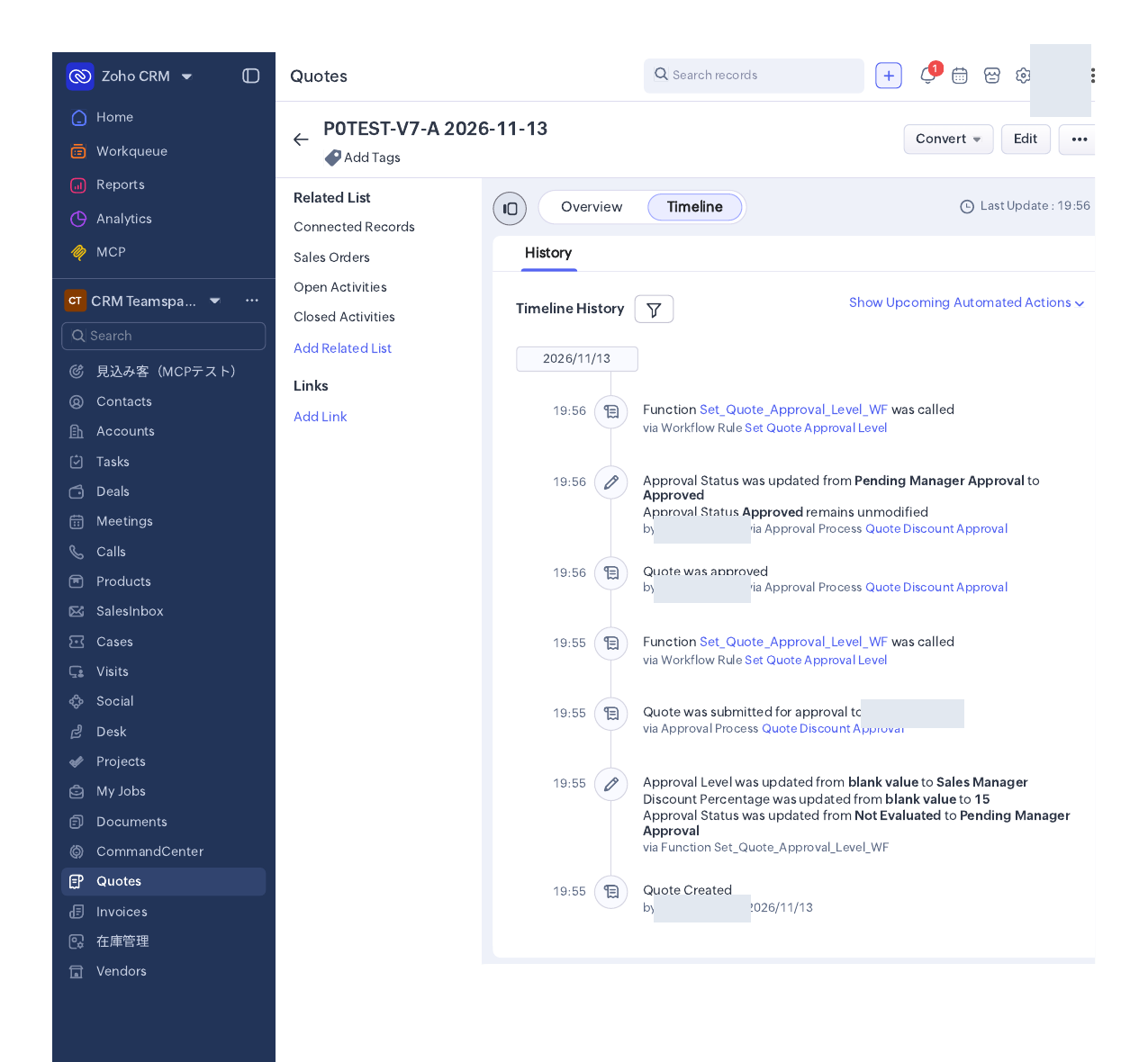
- Writes the three fields, then reads the record back and compares. If a value changed between the read and the write (a conflict), it does not overwrite. When the write submits the quote to the Approval Process, the record is locked and the read-back returns only a
"status"key, so for a Pending status that result is treated as "submitted", not as a failure.
Here is the core of the rate calculation and the threshold check, abridged from the final version (logging removed, constants inlined):
// taxTotal = sum of Tax across all Product_Details rows (computed earlier)
subTotal = ifnull(quote.get("Sub_Total"),0).toDecimal();
discount = ifnull(quote.get("Discount"),0).toDecimal();
adjustment = ifnull(quote.get("Adjustment"),0).toDecimal();
negAdjustment = 0;
if(adjustment < 0)
{
	negAdjustment = adjustment;
}
discountAmount = discount - negAdjustment;
denominator = subTotal - taxTotal;
if(denominator <= 0)
{
	mode = "REVIEW";
}
else
{
	rawPct = discountAmount / denominator * 100;
	pct = rawPct.round(2);
	if(pct < 0 || pct > 100)
	{
		mode = "REVIEW";
	}
}
if(mode == "")
{
	if(pct < 10.00)
	{
		newStatus = "Auto Approved";
	}
	else if(pct < 20.00)
	{
		newStatus = "Pending Manager Approval";
	}
	else
	{
		newStatus = "Pending VP Approval";
	}
}
The full function, including the line-item loop, state guards and read-back check, is in the GitHub sample: zoho-crm-discount-approval-sample.
How is the function triggered?
A workflow rule named "Set Quote Approval Level" runs on the Quotes module on Create or Edit, with repeat execution turned on so it fires on later edits too. A standalone function cannot be called directly from a workflow, so the rule calls an automation wrapper, Set_Quote_Approval_Level_WF, which calls the standalone function.
During verification, the rule is limited to test records with the condition "Subject starts with P0TEST". It has not been rolled out to all quotes.
In a firing test, editing a test quote ran the function automatically and the fields updated as expected.
How is the Approval Process designed?
An Approval Process is Zoho CRM's built-in feature that sends a record to approvers, locks it while it waits, notifies people, and keeps an approval history. The function only decides the tier; the Approval Process does the routing. The design follows Step 4 of Kaizen #230:
- Rule 1: Approval_Status is "Pending Manager Approval" → the requester's direct manager.
- Rule 2: Approval_Status is "Pending VP Approval" → two levels above the requester.
- Rule 3: Approval_Status is "Needs Manual Review" → the Record Owner's Manager (the same approver as Rule 1).
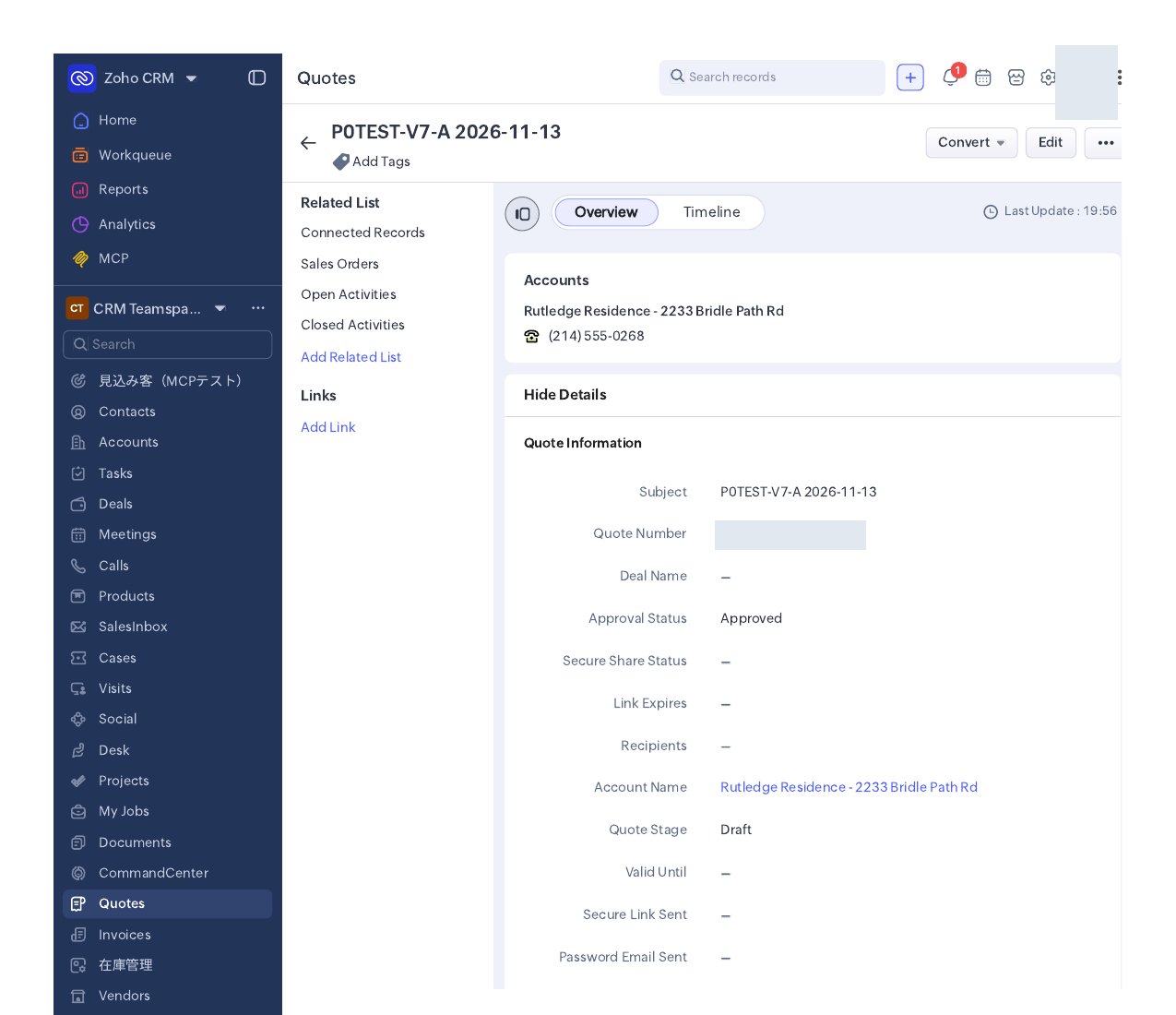
When a request is approved, a field update writes Approved to Approval_Status; when it is rejected, a field update writes Rejected.
The trial org used here has a single user, so the approvers are substituted with a specific user in the setup. In a production org, approvers are resolved through the reporting hierarchy: the requester's direct manager for Rule 1, and two levels up for Rule 2.
Measured on 2026-11-13: the process "Quote Discount Approval" was created and activated (Quotes, Create or Edit; Rule 1 "Pending Manager Approval" → Record Owner's Manager, Rule 2 "Pending VP Approval" → a specific user, Rule 3 "Needs Manual Review" → Record Owner's Manager; approval writes Approved, rejection writes Rejected). In additional verification that evening, the final version of the function (v7) carried both the Manager tier (Rule 1) and the VP tier (Rule 2) all the way through: a test quote was created, the workflow ran the function, the function wrote the status, and the quote was submitted to the process automatically. Approving wrote Approved to Approval_Status, rejecting wrote Rejected, and Approval_Level stayed in place in both cases. Nothing was overwritten: when the function ran again after the decision, its guards made it exit without writing.
Two details made this work:
- The write has to ask for approval evaluation. In Deluge,
updateRecordonly makes the Approval Process evaluate the record when the optional parameters explicitly settriggerto"approval". Writes without it did not submit the quote. - A submitted record cannot be read back. Once a quote is submitted, it is locked for approval, and
getRecordByIdreturns a response with only a"status"key (HTTP 204), so none of its fields can be read while it waits. The function's read-back check therefore has to treat this as "submitted, verification deferred", not as an error. Treating it as a normal failure and failing closed overwrites a correctly submitted quote with Needs Manual Review; that bug actually happened in v6 and was fixed in v7.
Rule 3 (Needs Manual Review, routed to the same approver as Rule 1) is configured in the process, but submitting a quote that is in Needs Manual Review from the start was not measured as a separate test, so Rule 3 is described here as configured, not as verified end to end.
What happened during verification?
All tests ran on test quotes named P0TEST-* in a Zoho CRM Ultimate trial org (currency JPY, one user) between 2026-11-11 and 2026-11-12. Nothing was written to a real quote.
The header Tax key was not in the API response
The first version read the header Tax from the getRecordById response. That key does not exist in the response. A $line_tax key is there, but in this org it was empty. The tax lives inside the line items.
The line items are also not a Deluge KEY-VALUE type, so calling containKey on a row throws a type error. Converting each row with toMap() makes key access work.
Multi-line tax was undercounted until v5
With more than one line item, the value comes back shaped like "{row 1},{row 2}". Version 4 decided whether the value was a List by looking at its first character, so it counted only the first row. On a fixture with two service lines (tax 10,000 + 5,000, Sub_Total 165,000, Discount 1,500), v4 summed the tax as 10,000 and stored 0.97%. The correct tax is 15,000 and the correct rate is 1.00%.
Version 5 stopped guessing the shape. It iterates the raw value directly with for each and sums every row. Re-running the same fixture overwrote 0.97% with the correct 1.00% (Auto Approved).
Fixture results
| Fixture | Rate | Expected status | Result |
|---|---|---|---|
| Two lines, tax 10,000 + 5,000 | 1.00% | Auto Approved | Match (v4 had stored 0.97%) |
| Mid-range | 15.00% | Pending Manager Approval | Match |
| No discount | 0.00% | Auto Approved | Match |
| Below the first threshold | 9.00% | Auto Approved | Match |
| Boundary: exactly 10% | 10.00% | Pending Manager Approval | Match, read-back match |
| Boundary: exactly 20% | 20.00% | Pending VP Approval | Match, read-back match |
| Boundary: just under 20% | 19.99% | Pending Manager Approval | Match, read-back match |
| Just over 10% | 11.00% | Pending Manager Approval | Match |
| No discount (second case) | 0.00% | Auto Approved | Match |
For the three boundary fixtures, I also read the fields back from the record and confirmed that the rate, status and level all matched.
What happens when the function cannot calculate the rate?
The gate is fail-closed. Fail-closed means that when the function cannot be sure of the answer, it chooses the safe outcome, Needs Manual Review, instead of guessing and continuing.
These cases all go to Needs Manual Review:
- The denominator (Sub_Total − Tax) is 0 or less.
- The rate falls outside 0–100.
- A required value is missing from the response.
- The line items are not in the expected shape.
- The function itself fails.
A quote with no line items is not calculated with tax treated as zero. It is routed to Needs Manual Review instead — a fail-closed decision, made deliberately.
Needs Manual Review is also an approval tier in the design (Rule 3, configured with the same approver as Rule 1, the record owner's manager), so a quote the function could not judge is meant to reach a human before it moves on.
Why replace per-record failure emails with a daily digest?
The first version (v1, 2026-11-10) sent an email to the admin each time a quote fell into the error path. Because it missed that the header Tax key does not exist in the getRecordById response, every quote fell into that path. Twelve failure emails arrived between 21:25 and 21:38. Each run sent one email; it was not a loop. I deactivated the workflow immediately to stop it.
The fix was to remove per-record email completely:
- A digest function,
quote_approval_review_digest, collects quotes that became Needs Manual Review in the last 24 hours. - It sends at most one email per day to the admin, and sends nothing when there are no quotes to report.
- A schedule, "Quote Approval Daily Digest", runs it every day at 09:00 (Asia/Tokyo).
One more API detail: in searchRecords criteria, date comparison operators on Modified_Time returned INVALID_QUERY. The digest therefore searches by status only, and filters the 24-hour window in code by turning the JST wall-clock string into a number and comparing.
In a manual run, eight quotes were collected into a single email. For the first scheduled run (2026-11-12 09:00), I checked the execution log directly: Status 200, 300 ms, 1 credit, and no email sent because there were zero quotes to report.
What are the scope and limits of this prototype?
- It was verified in a single-user Zoho CRM Ultimate trial org. Available features differ by edition, so check that your edition supports functions, workflow rules, approval processes and schedules before adopting this design.
- The Approval Process was verified end to end on 2026-11-13 with the v7 function for the Manager tier (Rule 1) and the VP tier (Rule 2): automatic submission, then approval writing Approved and rejection writing Rejected. Rule 3 (Needs Manual Review) is configured, but a quote that is in Needs Manual Review from the start was not submitted as a separate test, so Rule 3 is not claimed as verified end to end.
- Line-level discounts are outside the verified scope.
- During verification, the workflow runs only on P0TEST test records, not on all quotes.
- The thresholds are constants inside the function; changing them means editing it.
- The gate addresses one kind of routing mistake, a tier chosen from the wrong number. It does not replace human judgment on price.
If you want to know how a similar "human approves before anything changes" gate works for AI output, see how I gate AI-drafted updates behind human approval in Zoho CRM. For another case of replacing a standard feature with a Deluge function, see round-robin lead assignment rebuilt as a Deluge function.
FAQ
Can I just use the Discount field on the quote for approval rules?
You can, but it can put quotes in the wrong tier. Two 10% discounts combine to an effective 19%, not 20%, and a rule that reads one field cannot see a negative Adjustment either. Calculating one rate from amounts in a function and routing on that rate avoids both problems.
Does the Kaizen #230 formula work if my products have tax?
Check your Sub_Total first. In my test org, Sub_Total included the line-item tax, so dividing by it made the rate smaller than the real discount. Removing the summed line-item tax from the denominator fixed this. In a two-line fixture, the correct rate was 1.00%; undercounting the tax gave 0.97%.
What happens if the function fails or a quote has no line items?
The quote is set to Needs Manual Review, and the function does not guess. A quote with no line items is not calculated with zero tax. Needs Manual Review has its own approval rule (Rule 3), which routes it to the Record Owner's Manager — the same approver as Rule 1 — and those quotes are listed in the next daily digest email.
Will re-saving an approved quote trigger approval again?
No. If the quote is already Approved and the rate has not changed, the function does not overwrite the status. After a rejection, the quote is re-evaluated only when the rate or the tier changes.
About the author
Kotaro Izumida is a consultant who helps companies implement and customize Zoho CRM, including Deluge functions, workflows and approval designs. He publishes prototypes like this one with measured results, including what failed.
If you want to apply this kind of approval gate to your own quotes, send me a message on LinkedIn: LinkedIn, or contact me through the site.