From SoR to SoA: How Companies with Records Can Move Toward Action
If the business software world is moving from Systems of Record to Systems of Action, what should a company do if it already has customer records, deal records, invoices, contracts, and support histories?
My starting point is simple: do not throw away the System of Record.
The point is not to replace the system that stores records. The real transition is to keep the SoR as a trusted source of facts, then build a System of Action layer on top of it: a layer that decides what should happen next and helps execute it.
In this article, I use SoA to mean System of Action. It is a design pattern for turning CRM and business records into actual business actions.
Key idea: A company centered on SoR tries to hold accurate data. A company centered on SoA tries to make the right action happen at the right time.
What I Am Thinking About
Recently, I have been thinking that it is too narrow to see CRM as just a customer management tool.
CRM should be understood as a corporate memory system.
It is where a company remembers who it met, what was discussed, what was proposed, what failed, what was learned, and what should happen next.
If a CRM only stores names and phone numbers, it is just a database. What matters is whether the company can remember the context of the relationship: what the customer cares about, what the last decision was, what risk exists, and what the next action should be.
Even if a person leaves the company or the account owner changes, the company should still be able to remember the relationship. And ideally, that memory should trigger the next action.
That is how I think CRM should evolve: from a place where people store records into a memory system that helps the company act.
The Transition Model
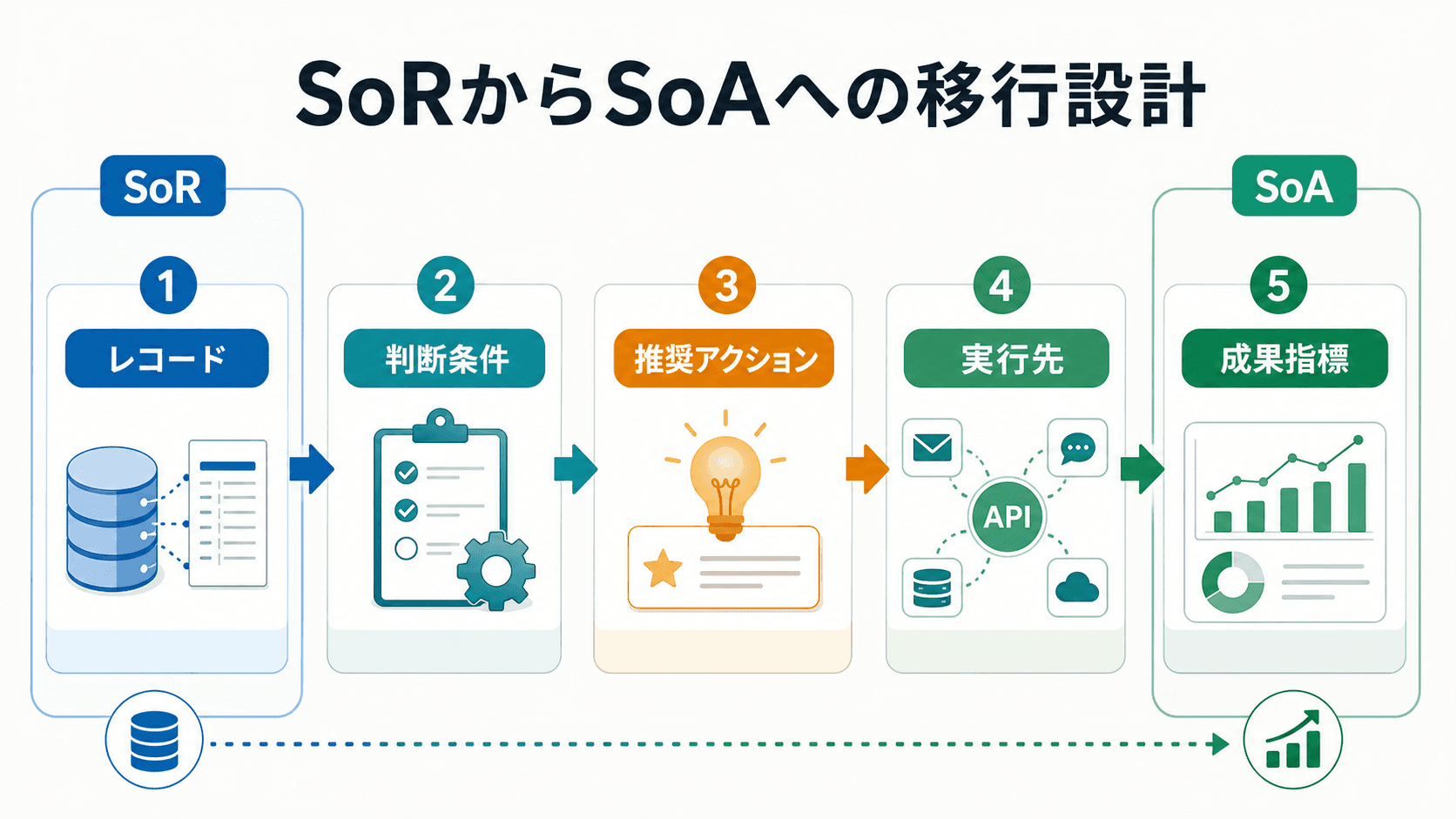
The move from SoR to SoA becomes easier to understand if we break it into five parts.
- Record: identify the facts that will be used for decisions.
- Decision condition: define what each record means in the business context.
- Recommended action: decide what should be proposed next.
- Execution channel: connect the action to email, Slack, CRM, LINE, billing tools, or another system.
- Outcome metric: look at the result and feed that learning back into the next improvement.
Once this flow exists, CRM is no longer just a place to look up records. It becomes a place that drives the next action.
1. Inventory the Existing SoR
The first step is not automation. It is inventory.
A company may already have records such as:
- customer records
- account records
- deal records
- invoice records
- contract records
- inventory records
- inquiry histories
- support histories
The important question is not only what fields exist. The important question is: what does each record mean in actual operations?
For example, "last contact date" is not just a date. In a sales follow-up context, it can mean "should we contact this customer again?"
"Invoice due date" is not just an accounting field. It can mean "should we send a reminder?" or "should someone check this internally?"
When designing SoA, we should stop looking at records as passive data. We should look at them as starting points for action.
2. Think in Business Actions, Not Records
In a SoR mindset, the main question is: what information should we store?
In a SoA mindset, the main question is: what should we do based on this information?
| Record in the SoR | Question in the SoA |
|---|---|
| CRM customer record | Should we contact this customer again? |
| Deal record | Should we prepare a quote, follow up, or prevent churn? |
| Invoice record | Should we send a reminder or check internally? |
| Inquiry history | Should this be escalated? |
| Contract record | Should we send a renewal notice or confirm terms? |
| Inventory record | Should we reorder, pause sales, or suggest an alternative? |
Once this translation is clear, the SoR becomes the decision material for the SoA.
3. Start with Recommendations
When people hear "System of Action," they often imagine full automation.
That is usually not the best starting point.
In the beginning, it is safer to start with recommendations.
For example, an AI assistant or rules engine might recommend:
- This customer has not been followed up for 30 days. Contact is recommended.
- This invoice is past due. An internal confirmation task is recommended.
- This inquiry came from an important customer. Notify the responsible person.
- This deal has had no movement since the quote was sent. Generate a follow-up draft.
At first, the system should recommend, and a human should approve.
This reduces anxiety in the team. People can see what the system is suggesting before anything is executed. It also helps the company learn which recommendations are useful and which ones are noise.
4. Create an Action Ledger
In a System of Action, it is not enough to know what was recorded.
We also need to know who took action, when, why, and with what result.
That is why I think companies should create something like an Action Ledger alongside the SoR.
An Action Ledger may include:
- target record
- decision condition
- recommended action
- who or what recommended it
- who approved it
- when it was executed
- execution channel
- result
- next action taken
This makes the quality of the SoA visible.
Which recommendations were accepted? Which automated actions created value? Which conditions caused false positives? Without this ledger, it is difficult to improve the action layer.
A SoA is not something that is built once and finished. It should improve by learning from executed actions and their outcomes.
5. Automate Where APIs Exist
Execution matters.
Even if the system recommends the right action, the business does not move unless there is a way to execute that action.
The most realistic starting point is to automate actions that already have API or standard integration paths.
Examples include:
- sending an email
- sending a Slack notification
- updating CRM
- creating a task
- sending a billing reminder
- sending a LINE message
- creating a calendar event
- creating a support ticket
These are good candidates for early SoA work.
If execution still depends on verbal confirmation or paper documents, the execution path itself must be redesigned first.
Maturity Levels
The transition to SoA can be understood in five levels.
| Level | State | Description |
|---|---|---|
| Level 1 | View the SoR | Records exist, but humans decide the next action manually. |
| Level 2 | Recommend the next action | AI or rules suggest what should happen next. |
| Level 3 | Execute after human approval | After approval, the system creates a task, sends a notification, or prepares a message. |
| Level 4 | Automate under clear conditions | Low-risk and clearly defined actions are executed automatically. |
| Level 5 | Learn from outcomes | Results are used to update conditions and future actions. |
Many companies can change a lot just by moving from Level 1 to Level 2 or Level 3.
The goal does not need to be full autonomy at the beginning. The first goal should be to improve the quality of recommendations under human review.
How I Would Build This in Zoho
In Zoho, I would place Zoho CRM at the center of the corporate memory system.
Customers, deals, inquiries, activities, owners, statuses, and next actions should be stored in CRM. That is the SoR. It is the trusted source of facts.
Then I would build the SoA layer gradually.
| Role | Zoho components |
|---|---|
| Store the records | Zoho CRM |
| Trigger actions based on status | Workflow |
| Standardize process steps | Blueprint |
| Handle complex conditions and integrations | Functions / CRM API |
| Capture inquiries and conversations | SalesIQ |
| Build supporting apps and screens | Creator |
| Connect to meetings and reservations | Bookings |
| Assist with data organization and suggestions | Zia |
| Let agents support execution | Zia Agents / Agent Studio |
For sales follow-up, the flow might look like this:
- Store deals, customers, last contact date, and deal stage in Zoho CRM.
- Detect deals that have had no movement for a set period after a quote was sent.
- Let Zia or a rule suggest the next follow-up.
- Notify the owner or create a CRM task.
- Prepare an email draft or connect to a meeting booking flow if needed.
- Store the result back into CRM activity history and the Action Ledger.
For support or inquiries, SalesIQ or forms can capture the conversation, CRM can store the record, AI can summarize it, and a workflow can create the right task for the right person.
For interviews or appointment-heavy work, SalesIQ, CRM, Creator, Bookings, and external AI APIs can be combined to handle the first conversation, summarize the content, notify the responsible person, and move toward the next meeting.
The important point is not to make everything autonomous from day one.
The practical order is: store the record, let AI organize it, let a human review it, then execute after approval.
This Is Not Only About Zoho
At the same time, this movement is not limited to Zoho.
New tools are emerging across CRM, support, sales enablement, workflow automation, knowledge management, and AI agent platforms.
Traditional SaaS assumed that a human would open a screen, enter fields, and press buttons. Increasingly, software will assume that an AI agent can read records, understand context, recommend actions, and in some cases execute them.
So the question is not only "which CRM should we use?"
The questions are:
- Which system is the trusted source of facts?
- Which AI should read which data?
- How far should automation go?
- Where should human review stay?
- How should the result be written back into memory?
That design itself is becoming important.
I work mainly with Zoho, but I do not think the world ends inside Zoho. I am also studying AI agents, Agent Studio-style tools, copilots, app generation, RAG, knowledge management, and workflow automation.
My current stance is practical: build what can be built reliably in Zoho, and connect external tools through APIs when they are a better fit.
The First Workflow to Choose
The transition should not start with a company-wide transformation project.
Start with one workflow where records exist, but action is often delayed.
Good candidates include:
- sales follow-up
- overdue invoices
- support inquiries
- dormant customer reactivation
- post-quote follow-up
- contract renewal notices
- candidate follow-up in hiring
The selection rule is simple:
"The data exists, but the next action does not happen consistently."
That is usually a good starting point for SoA.
Put It on One Page
The first concrete action is to choose one workflow and summarize it on one page.
| Item | What to write |
|---|---|
| Record | The data in the SoR that becomes decision material |
| Decision condition | The state that should trigger action |
| Recommended action | What the system should suggest next |
| Execution channel | Which system, channel, or person should receive it |
| Outcome metric | How the result should be judged |
For example, for sales follow-up:
| Item | Example |
|---|---|
| Record | Deal, customer, last contact date, stage, quote date |
| Decision condition | No movement for seven days after quote sent |
| Recommended action | Generate a follow-up email draft and ask the owner to review |
| Execution channel | CRM task, email draft, Slack notification |
| Outcome metric | Reply rate, next meeting rate, collected loss reasons |
Once this one-page model exists, the SoA design becomes much more concrete.
Summary
SoR should not be discarded. It should remain as the trusted source of facts.
But a company should not stop at having accurate records.
The next step is to build a layer that turns those records into recommendations, execution, and learning.
In Zoho, that can be done by placing CRM at the center, then adding Workflow, Blueprint, Functions, API integrations, SalesIQ, Creator, Bookings, Zia, and Zia Agents where they fit.
At the same time, new AI agent tools and workflow platforms are emerging quickly. I want to keep learning from those movements while building practical, reliable implementations in Zoho.
For me, the goal is not simply to help companies store customer data.
The goal is to help companies build memory that leads to the right next action.