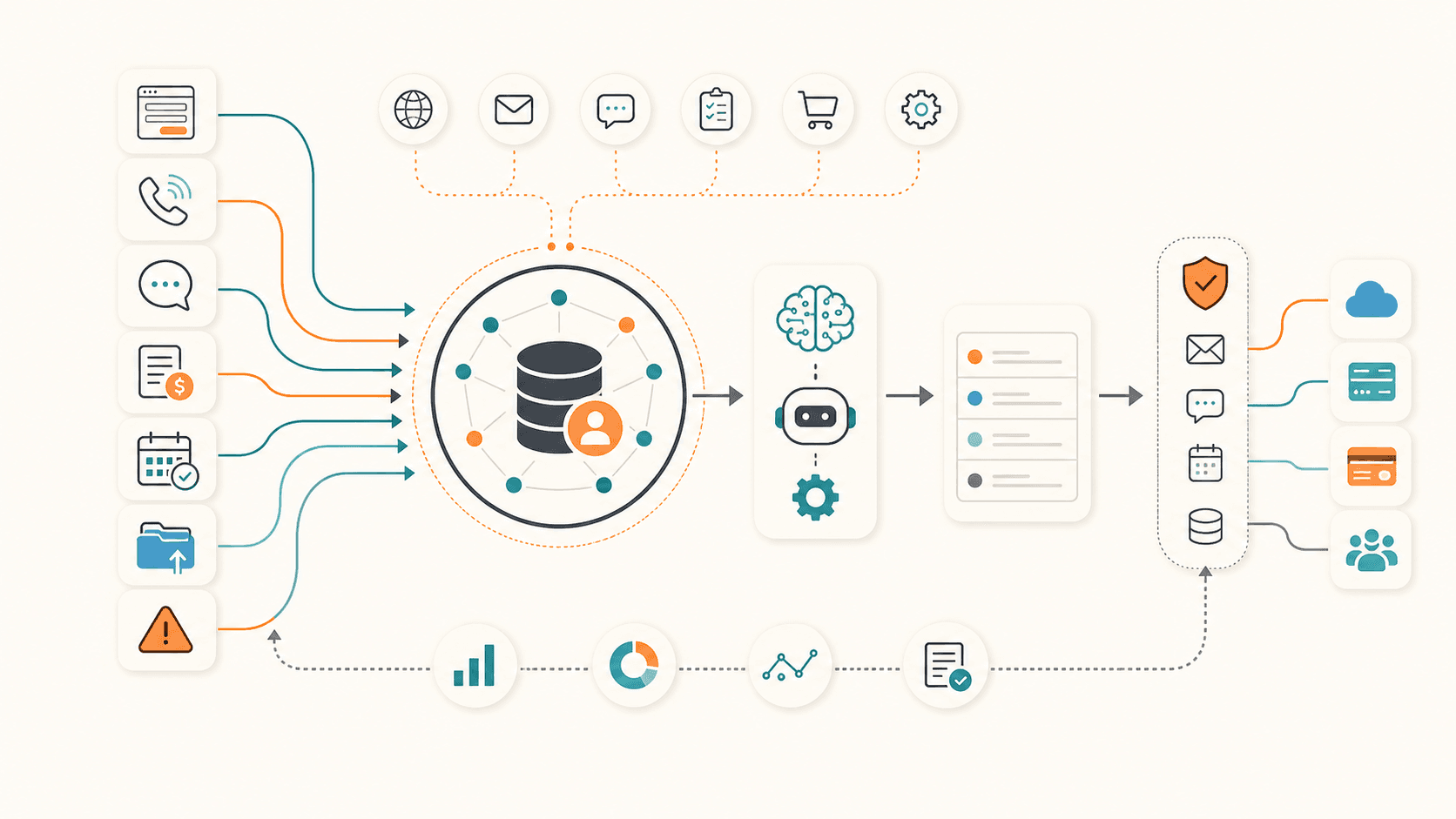
The Event-Driven CRM: From System of Record to System of Context and Action
For a long time, CRM was designed around records.
A customer record, a deal record, an activity record, an invoice record, a support ticket, a meeting note, a task.
That is still important. A company needs a trusted place where facts are stored. But I think the next stage of CRM is not only about improving the record screen. It is about changing the CRM from a passive database into an event-driven system that understands what is happening and helps the company act.
The key shift is this:
CRM should not wait until someone opens a screen and updates a field. CRM should receive operational events as they happen, understand the context, and help decide the next action.
This is where webhooks become more than a technical integration detail.
If designed well, webhook intake can become the main nervous system of a modern CRM architecture.
The Three Layers
I see the next CRM architecture as three connected layers.
| Layer | Role | Main question |
|---|---|---|
| System of Record | Store trusted business facts | What do we know? |
| System of Context | Collect events and reconstruct the situation | What is happening now? |
| System of Action | Recommend and execute the next step | What should happen next? |
The System of Record remains important. It is the memory layer.
But records alone are not enough. A company also needs a System of Context that collects signals from daily operations: conversations, forms, meeting transcripts, payments, schedules, uploads, vendor replies, complaints, errors, and other meaningful events.
Then, on top of that context, the company can build a System of Action: a layer that recommends what to do, asks for approval when needed, and executes low-risk actions through controlled connectors.
This is close to the direction of SFA and marketing automation, but broader. It is not only about sales follow-up or campaign delivery. It is about turning the whole operating flow of the business into a context-aware action system.
Why Webhooks Matter
Many business systems already produce events.
Examples include:
- a form was submitted
- a meeting transcript was completed
- a call ended
- an email was received
- a file was uploaded
- an invoice was paid
- a payment failed
- a booking was created
- a booking was canceled
- a vendor replied
- a support issue was escalated
- an automation failed
- a CRM record changed stage
Each of these events may look small on its own. But together, they describe what is happening in the business.
In a traditional CRM workflow, many of these events stay scattered across different tools. People have to check inboxes, meeting tools, billing tools, forms, chat, file storage, and CRM one by one. The context is fragmented.
In an event-driven CRM, those events enter a unified intake layer.
The intake layer does not need to be a large backend application. It can be intentionally thin. Its job is to receive events, verify them, normalize them, connect them to the right customer or business record, and decide what should happen next.
Not Every Log Is Worth Keeping
It is tempting to say, "collect every log."
In practice, that is risky.
If every technical log, every low-value notification, and every duplicate payload enters the CRM context, the system becomes noisy. It also increases privacy risk, storage cost, and review burden.
The better framing is:
Collect operational events worth acting on.
An event is worth collecting if it can change a decision, trigger a follow-up, explain a customer situation, reduce manual work, or become useful evidence later.
For example, a completed meeting transcript may be useful because it can generate a summary, identify action items, and update the customer context.
A payment failure may be useful because it should trigger a customer-friendly follow-up or an internal task.
A low-level debug message may not be useful unless it indicates a business process failure.
The event-driven CRM should be selective. It should collect enough context to support action, not everything just because it is available.
The Thin Backend Pattern
When people hear "AI agent," they sometimes imagine that the backend can disappear.
I do not think that is the right framing.
The backend should become thinner, but it should not disappear.
The thin backend has several important jobs:
- receive webhook events
- verify signatures and shared secrets
- normalize payloads from different tools
- match events to customer, deal, project, or asset records
- deduplicate repeated events
- store raw input and processed output
- create a review queue
- start AI agent sessions
- execute approved actions through connectors
- log what happened and why
- retry failed operations safely
The AI agent should not hold uncontrolled write access to production systems.
Instead, the agent should reason over context and request an action. The thin backend should decide whether that action is allowed, whether human approval is required, and which connector should execute it.
This separation is important.
AI can be used for judgment, classification, summarization, drafting, and recommendation. Deterministic code should handle authentication, idempotency, permissions, retries, and final system writes.
The Review Queue Becomes the Operating Surface
If the CRM becomes event-driven, the most important screen may no longer be the record detail page.
It may be the review queue.
The review queue is where incoming events become proposed actions.
For example:
| Event | Context built by the system | Proposed action |
|---|---|---|
| Meeting transcript completed | Customer, property, issue, urgency, mentioned vendors | Create follow-up tasks and draft a customer summary |
| Payment failed | Invoice, customer history, recent communication | Create an internal check task and draft a polite reminder |
| Booking canceled | Customer, service type, urgency, previous schedule | Suggest rescheduling options |
| Vendor replied with estimate | Open deal, vendor history, customer preference | Compare estimate and prepare customer-facing explanation |
| File uploaded | Related record, document type, extracted content | Attach to the right record and ask for review |
| Automation error occurred | Failed process, affected record, retry status | Notify the owner with a clear recovery step |
At first, humans should review most actions.
That is not a weakness. It is how the system learns what good action looks like.
The review queue creates a practical bridge between manual operations and automation. It lets the business start with recommendations, then gradually automate low-risk cases after enough confidence has been built.
Action Should Be Risk-Tiered
Not all actions have the same risk.
An event-driven CRM should separate actions into risk levels.
| Risk level | Example action | Recommended handling |
|---|---|---|
| Low | Add an internal note, classify a transcript, create a draft task | Allow automation after validation |
| Medium | Update a CRM stage, assign an owner, send an internal notification | Allow with rules or review |
| High | Send a customer message, commit to a schedule, create an invoice | Require human approval |
| Critical | Refund, cancel service, change contract terms, expose sensitive data | Keep human-owned |
This is where an AI-era CRM must be careful.
The goal is not to make the AI autonomous everywhere. The goal is to make the next action visible, faster, and safer.
Autonomy should expand by category, not all at once.
System of Context
The phrase "System of Context" is useful because it describes what is missing between records and action.
A record says:
"This customer exists."
Context says:
"This customer submitted a form yesterday, had a call this morning, mentioned an urgent issue, received an estimate from a vendor, and has an unpaid invoice that may affect the next step."
That is a different level of understanding.
In many companies, this context lives inside people's heads, Slack threads, inboxes, call notes, and meeting recordings. The CRM has the record, but not the whole situation.
An event-driven CRM tries to reconstruct that situation.
It can combine:
- the stable record in CRM
- recent conversation history
- forms and structured submissions
- call and meeting transcripts
- billing and payment events
- schedules and appointments
- files, photos, and documents
- previous outcomes
- current open tasks
Once that context exists, an AI agent can make more useful recommendations.
Without context, AI becomes a generic assistant. With context, AI becomes an operational assistant.
System of Action
The System of Action layer turns context into movement.
It can:
- classify the event
- identify missing information
- recommend the next action
- draft a message
- create a task
- update a CRM field
- route an issue to the right person
- prepare a quote follow-up
- create a booking reminder
- flag an escalation
- write the result back to the record
But the important word is "guarded."
The system should not simply execute everything the AI suggests.
The action layer needs gates:
- Is the event trusted?
- Is the customer matched confidently?
- Is the suggested action allowed?
- Is this action low-risk?
- Does a human need to approve it?
- Has this event already been processed?
- Can the action be reversed?
- Will the result be logged?
These gates make the system usable in real operations.
The Action Ledger
If CRM evolves into a System of Action, it also needs an Action Ledger.
The Action Ledger records what the system recommended and what actually happened.
It may include:
- source event
- related record
- context used
- recommended action
- risk level
- approval status
- execution channel
- execution result
- human override
- final outcome
This matters because AI workflow quality cannot be improved only by looking at prompts.
The business needs to know which recommendations were accepted, which were rejected, which actions created value, and which ones created noise.
Without an Action Ledger, the company cannot measure whether the action layer is improving operations.
With an Action Ledger, every action becomes training material for better rules, better prompts, better workflows, and better operating policy.
A Practical Architecture
A practical event-driven CRM can be designed with five parts.
| Part | Responsibility |
|---|---|
| Event intake | Receive webhooks and API events from business tools |
| Context builder | Match the event to records and collect related information |
| Review queue | Show proposed actions and missing questions |
| Action connectors | Execute approved actions in CRM, messaging, billing, scheduling, or file systems |
| Action Ledger | Store decisions, approvals, results, and feedback |
This does not require a large rewrite at the beginning.
The first version can be small:
- Choose one event source.
- Normalize the payload.
- Match it to a CRM record.
- Ask an AI agent to classify it and suggest the next action.
- Put the result into a review queue.
- Let a human approve or reject.
- Log the result.
That is already a meaningful move from record management toward action management.
Where to Start
The best starting point is not the most advanced AI scenario.
The best starting point is a workflow where:
- events already exist
- action is often delayed
- context is spread across tools
- the next step is repetitive but still needs judgment
- the cost of missing the follow-up is visible
Good candidates include:
- post-meeting follow-up
- service intake
- quote follow-up
- overdue invoice handling
- booking changes
- customer complaint triage
- vendor response handling
- uploaded document review
- failed automation recovery
The selection rule is simple:
Start where the business already has signals, but the next action is inconsistent.
That is where the event-driven CRM creates value quickly.
How This Changes CRM, SFA, and Marketing Automation
SFA traditionally helps manage sales activities.
Marketing automation traditionally helps trigger campaigns and nurture flows.
An event-driven CRM absorbs parts of both, but it also goes beyond them.
It does not only ask, "Which campaign should this lead receive?"
It asks:
- What just happened?
- Which customer or business record does it affect?
- What context do we already know?
- What action should be recommended?
- Should the system act, or should a human approve?
- What happened after the action?
That is why I think the future of CRM is not only a better database or a better sales pipeline.
It is a context and action layer around the operating system of the business.
Common Mistakes
There are several mistakes to avoid.
The first is collecting too much noise. More logs do not automatically create better context.
The second is giving AI direct write access too early. AI should request actions through controlled tools, not freely modify production systems.
The third is skipping deduplication. Webhooks retry. Systems resend events. Without idempotency, the same event can create duplicate tasks, messages, or records.
The fourth is ignoring human review. Review is not only a safety mechanism. It is the feedback loop that teaches the system what good judgment looks like.
The fifth is failing to log outcomes. If the company cannot see which actions worked, the system cannot improve.
Summary
The next CRM pattern is not simply "add AI to CRM."
It is to build an event-driven CRM architecture:
- keep the System of Record as the trusted memory
- add a System of Context that receives meaningful operational events
- use AI agents to classify events and recommend next actions
- execute actions through guarded connectors
- keep an Action Ledger so the system can improve
In this model, webhooks are not just integration plumbing.
They are the entry point for business context.
And once context is captured, CRM can move from a place where people store information into a system that helps the company understand, decide, and act.