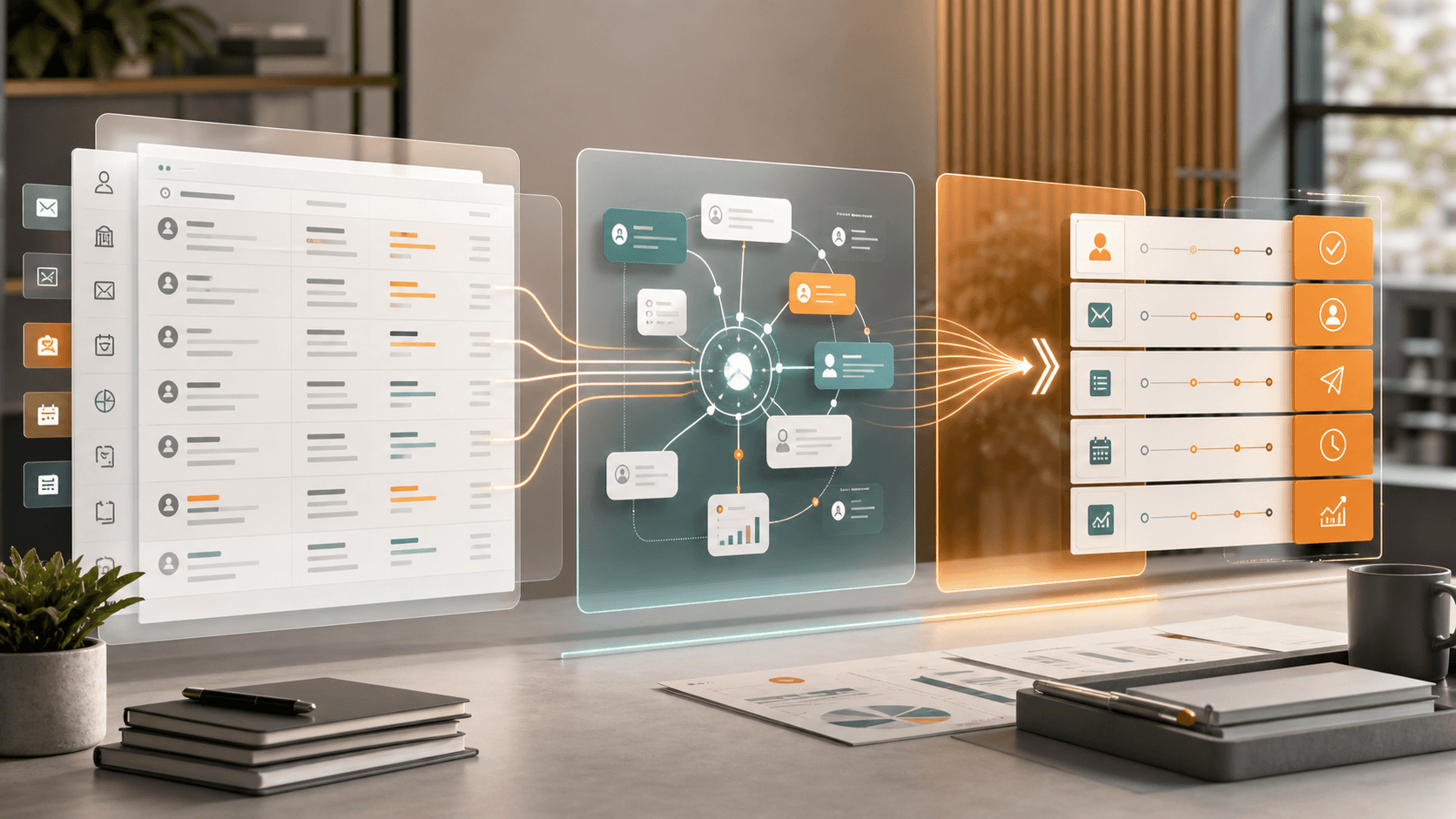
A Concrete SoR to SoC to SoA Example: Records, Context, and Human-Approved Action
When I explain CRM and AI workflow design, I often use the sequence SoR → SoC → SoA.
SoR means System of Record. It is the trusted place where customer data, deals, inquiries, invoices, activity history, and other business facts are stored.
SoC means System of Context. It is the layer that collects forms, chats, emails, meeting notes, files, past history, and recent events, then reconstructs what is happening now.
SoA means System of Action. It is the layer that recommends the next step and, when appropriate, executes it through a guarded workflow after human approval.
The point is not to replace CRM with AI. The practical point is to keep reliable records, add context around them, and connect that context to safe action.
Example: Handling an Inquiry
Imagine a simple workflow: a customer submits an inquiry through a web form.
In a traditional flow, a person receives the notification, opens the CRM, checks past history, thinks about the reply, asks someone internally if needed, and then updates the record.
That works, but the next action often depends too much on the individual person's memory and available time.
If we separate the flow into SoR, SoC, and SoA, it becomes clearer.
| Layer | Role | Inquiry example |
|---|---|---|
| SoR | Store trusted facts | Customer profile, past inquiries, owner, contract state |
| SoC | Organize the situation | Current inquiry, past context, missing information, urgency |
| SoA | Move toward action | Reply draft, internal task, owner notification, CRM update proposal |
The important part is that AI does not need to become the uncontrolled executor.
At the beginning, AI can support review.
- summarize the inquiry
- identify missing information
- connect it to past CRM history
- list what the owner should check
- draft a reply
- suggest which CRM fields or notes should be updated
The human owner then approves, edits, or rejects the suggestion.
This makes AI useful without handing over final operational control too early.
Without Context, AI Produces Generic Answers
If you simply ask an AI to reply to an inquiry, it can produce a polite message.
But polite is not enough for operations.
The system needs to know who the customer is, what happened before, whether there are open tasks, whether the contract or billing state matters, and what the company promised previously.
Without that context, an AI reply can sound good but still be operationally wrong.
That is why a System of Context is needed on top of the System of Record.
The SoC is not only for AI. It is also a review surface for humans.
The question is:
"What does this event mean, which record is it related to, what information is missing, and what decision needs to be made next?"
Once that is visible, human judgment becomes easier.
Action Should Come After Approval
After context is organized, the next step is action.
But not every action has the same risk.
| Action | Risk | Initial handling |
|---|---|---|
| Create an internal task | Low | Can be automated early |
| Send an internal notification | Low to medium | Automate under conditions |
| Update a CRM field | Medium | Start with approval |
| Send a customer-facing reply | High | Require human review |
| Change a contract or invoice | High | Keep human-owned |
Even if AI becomes more capable, the goal is not to automate everything at once.
A practical sequence is:
- AI summarizes the event and missing information.
- AI recommends possible next actions.
- A human approves or edits the recommendation.
- The system creates the task, notification, draft, or CRM update.
- The result is written back to the record.
This lets the team see what is happening before anything important is executed.
Keep an Action Ledger
If you build a System of Action, you need an Action Ledger.
The Action Ledger records what the system recommended, how the human responded, and what actually happened.
It can include:
- source inquiry or event
- related CRM record
- context used by the AI
- recommended action
- approval decision
- edits made by the human
- execution result
- next improvement note
This is how AI workflow design becomes an operating system improvement, not just a prompt experiment.
The company can learn which recommendations were useful, which were noise, and which categories are safe enough for more automation later.
Start with a Small Review Queue
For a first implementation, I would not start with a large autonomous agent.
I would start with a small review queue.
When a meaningful business event arrives, such as an inquiry, form submission, meeting note, or file upload, the system places an AI-organized summary into a queue.
The human reviewer decides:
- no action needed
- notify the owner
- use the reply draft
- append this to CRM
- ask for more information
As those decisions accumulate, the company can identify low-risk patterns that can be automated safely.
Implementation Sketch: From Form 2.0 to a Review Queue
In practice, I would not start by replacing the CRM. I would keep Zoho CRM as the trusted record layer and route information from Form 2.0 or similar intake surfaces into a review queue inside CRM.
CRM continues to store customers, deals, inquiries, activities, notes, and ownership. Around it, a thin backend receives meaningful operational events such as form submissions, photos, emails, chats, meeting notes, file uploads, and webhooks.
That backend verifies the source, removes duplicates, matches the event to CRM records, organizes the context, and asks AI to prepare a summary and possible next actions. The proposed actions should not be executed immediately. They should first appear inside Zoho CRM, for example in a WebTab, related list, custom button, or settings widget.
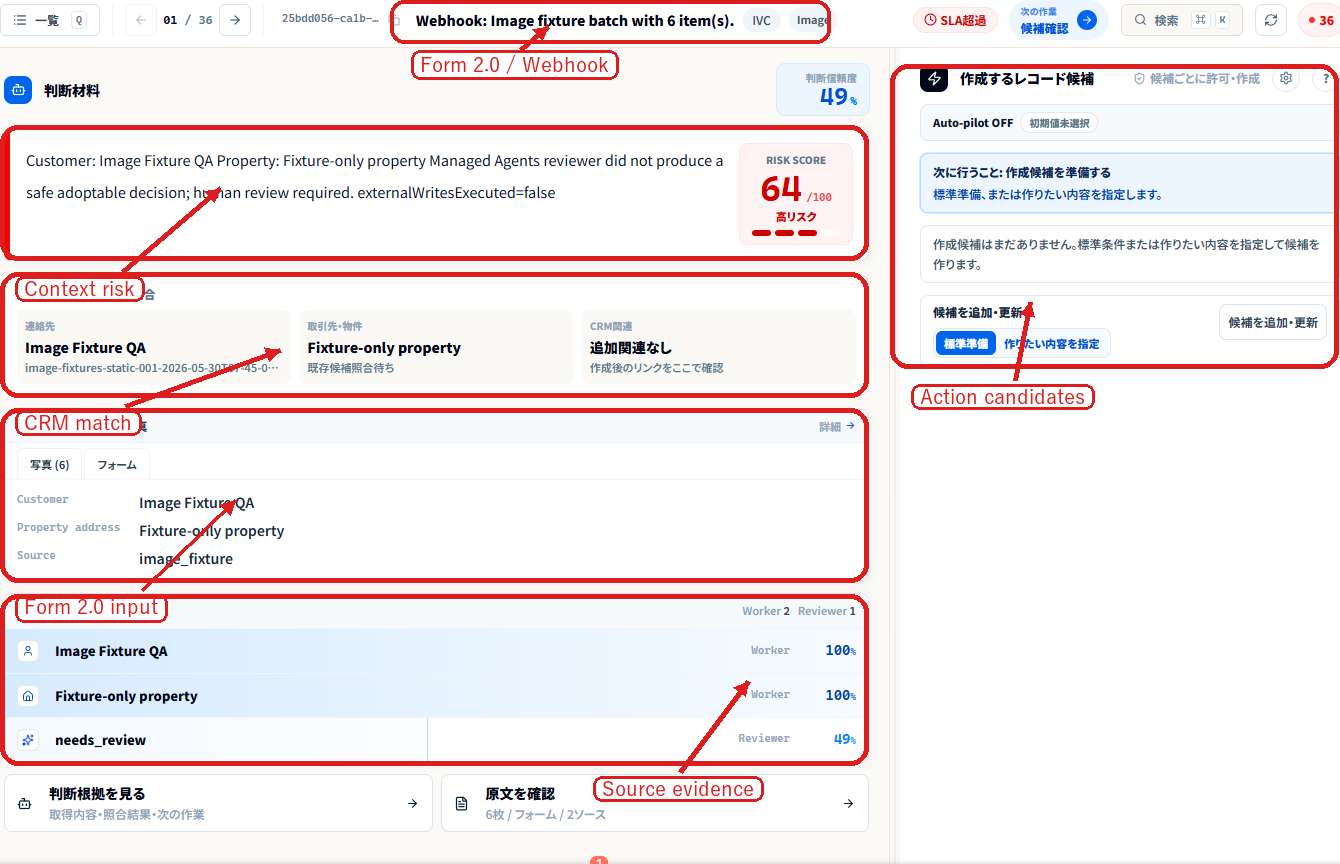
The screenshot above is a demo review surface inside Zoho CRM. It brings together Form 2.0-style intake data, photos, CRM matching, AI judgment, and action candidates. The key is to show proposed actions for human review before anything operational is executed.
A minimal build can follow this sequence:
- Receive the intake: accept Form 2.0 data, a web form, photos, files, or a webhook.
- Match it to CRM records: find the customer, property, deal, inquiry, prior notes, and owner.
- Build the context: clarify what happened, what is missing, where the risk is, and who should review it.
- Show the review surface: use a Zoho CRM widget to display the source, matched records, evidence, judgment, and action candidates.
- Keep approval human-owned: let the owner approve, edit, reject, or hold the proposed action.
- Execute after approval: create a task, append a note, update a field, send a notification, or prepare a reply draft.
- Write the Action Ledger: record what was proposed, who decided, what changed, and what happened next.
For implementation references, start with Zoho's official Widgets in Zoho CRM, Working with Widgets, Create Your First Widget, and ZDK CLI Widgets documentation.
Summary
SoR → SoC → SoA is not a story about replacing CRM with AI.
It is a practical design for keeping CRM as the trusted memory layer, adding context around operational events, and connecting that context to human-approved action.
The first step is not full autonomy.
The first step is to organize records, collect context, let AI prepare recommendations, let people review them, and execute only after approval.
That small sequence can turn CRM from a place where people look up records into a system that helps the company act consistently.