
The short answer: A Zoho CRM workflow rule triggered by a record action, such as a create or an edit, evaluates only that record at that moment, so a rule you add today does nothing to existing records that nobody touches. The built-in exception, a date-field trigger, does cover every matching record, but it runs on the date and has no dry run or approval step. To apply a rule to existing records safely, you need three steps: a dry run that shows what would change, an explicit approval, and an execution that works in checkpointed batches so it can stop, resume, and never write the same record twice. I built that as a Deluge prototype. On 326 leads, the dry run predicted 195 changes, and the execution made exactly 195.
Prototype note: everything below was built and tested in my own Zoho CRM organization (Ultimate trial, JP data center) with synthetic data on 10 and 12 November 2026. It is not client work, and every number is from that test environment.
A backfill is a one-off job that applies a rule to records that already exist, instead of waiting for each record to be edited. This post covers why Zoho CRM needs one, what the built-in bulk tools do and do not cover, how the prototype is built, what it measured, and where it falls short.
Why don't record-action workflow rules in Zoho CRM update existing records?
One of the triggers a workflow rule can use is a record action: a record is created, edited (including an update to a specific field), or deleted (Zoho CRM help: configuring workflow rules). A rule like that is evaluated at the moment of the action, for that record only. Records that already exist and are not touched are not evaluated, so a rule you create today does not change yesterday's records. For these rules there is no built-in "run this rule over existing records" button.
There is one built-in exception. A rule triggered by a date field covers every record that matches its criteria, can repeat monthly or yearly, and, according to the same help page, is processed in batches of up to 5,000 records per 10 minutes. It is driven by the date, though, and it cannot evaluate a rule with a dry run, an approval step, or a calculation, so it is not a substitute for a backfill.
That leaves a gap. For example: you add a record-action rule that flags leads with no progress for more than 90 days. New and edited leads get flagged. The leads that went quiet last quarter do not, because nobody touches them, and nobody touches them because they are not flagged.
What do Zoho's built-in bulk tools cover, and where do they stop?
Each official option solves part of the problem. None of them evaluates a rule per record, in resumable batches, with a dry run.
| Option | Official limit | Why it is not a backfill |
|---|---|---|
| Mass Update API, custom view / territory | Up to 50,000 records; automation rules fire only when the record count is less than 1,000 | Above 1,000 records no workflow fires, and every record gets the same value |
| Mass Update API, record ids | Up to 500 records per call; automation fires | Every record gets the same constant value; no per-record evaluation |
| Update Records API | Up to 100 records per call | A building block, not a job: no paging, checkpoint, or resume |
| Bulk Write API | Up to 25,000 records per CSV file | You compute the values outside CRM first; no dry run or per-record ledger |
| COQL (CRM Object Query Language, Zoho CRM's SQL-like read API) | Up to 2,000 records per call | Read only |
On top of that, a Schedule function in Deluge is cut off at 15 minutes (Functions limits and quotas), so a long job has to be split across several runs.
Two honest caveats before building anything:
- If every record should get the same value, use Mass Update. You do not need an engine.
- If you can compute the values in a spreadsheet and the job runs once, Bulk Write is simpler.
A backfill engine is for the case in between: a different value for each record, computed from its current state, inside CRM, with the ability to stop and resume and a record of where every record landed.
How does a safe backfill work in Zoho CRM?
The prototype is a set of Deluge functions plus two custom modules. Deluge is Zoho's scripting language. Backfill_Runs holds one record per job. Backfill_Logs is the ledger.
The flow has four steps:
- Dry run. The Runner function pages through the target module, evaluates every record, and writes nothing to it. It records how many records it evaluated and how many would change.
- Approval. An approval function moves the job to
Queuedonly if the rule version in the code still matches the job, a fingerprint of the configuration still matches, and the dry run is at most 7 days old. The fingerprint is a text string, frozen at dry run time, that joins the rule, its version, the record boundary, and the evaluation date (both explained below), so a mismatch shows that the conditions you approved have changed since the dry run. - Checkpointed execution. The Runner evaluates every record again (it does not replay the dry run) and writes only the records whose values change. After each invocation it saves a cursor, so the next invocation continues from the last processed id.
- Retry Run. A helper collects the ids of records that failed and creates a new job for those ids only.
What does the ledger record?
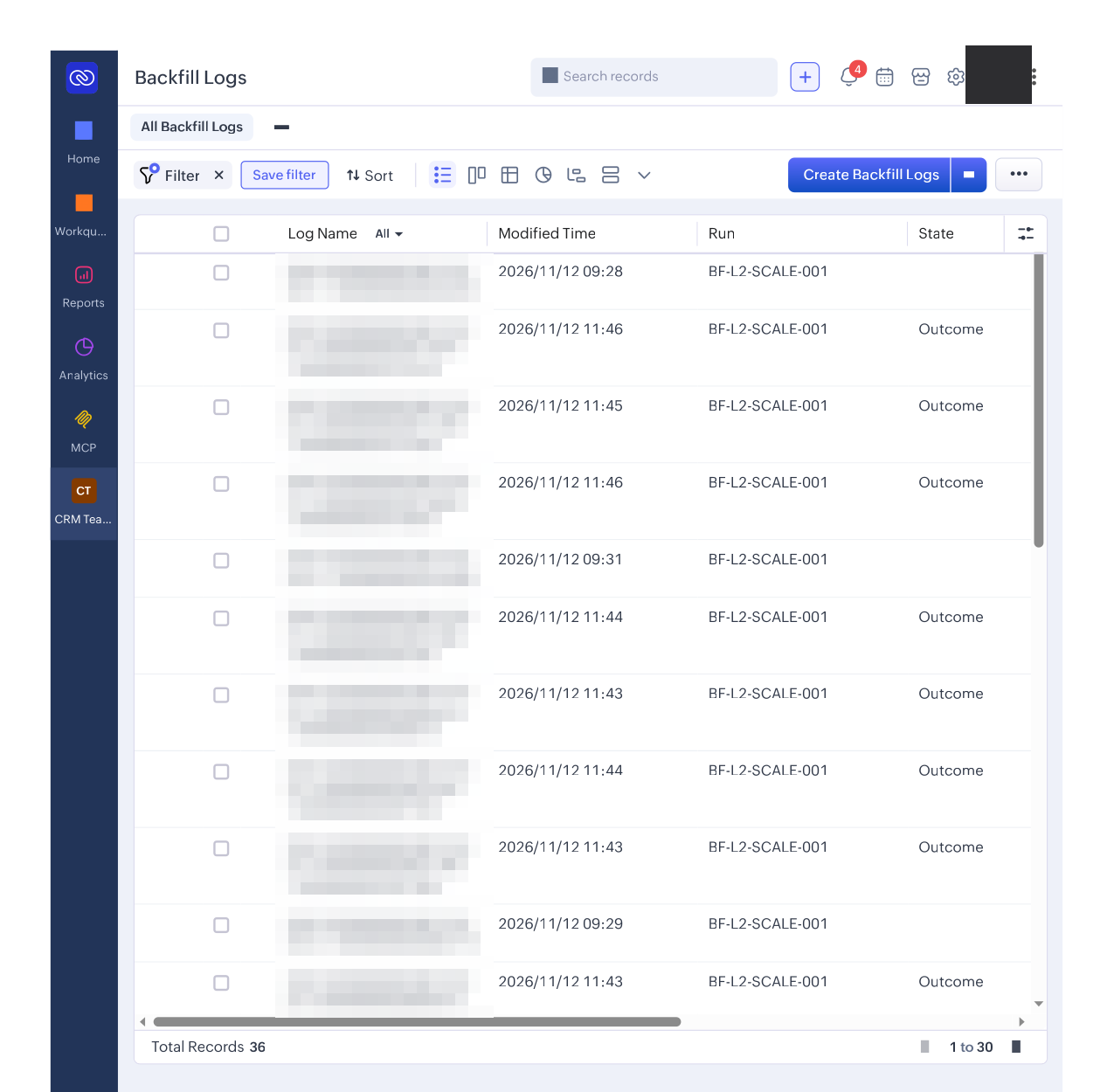
For each batch of up to 100 records, the Runner:
- creates a log row with
State = Intent, holding the evaluated ids and the proposedold -> newvalues, - re-reads the batch and skips records that changed since the page was read (
STALE) or no longer exist (MISSING), - sends one update with
"trigger": []so workflows do not fire, - checks every element of the response, not just the HTTP status, and writes a failure row for each record that did not succeed,
- updates the log row to
State = Outcome.
The cursor moves only after step 5. A row left in Intent marks a batch whose result was never recorded.
Why freeze the boundary and the evaluation date?
The boundary. At dry run time the Runner takes the largest matching record id and freezes it. Every page is id > cursor and id <= boundary, ordered by id, with no OFFSET. The scope of a job is therefore a fixed set of ids, so a record cannot be both predicted and missed.
The evaluation date. Rules like "more than 90 days" depend on what "today" is. The prototype fixes that date at dry run time and puts it in the fingerprint. If you approve on Monday and the job finishes on Wednesday, every record is still judged as of Monday. In a test, the same lead was 80 days old (not flagged) when evaluated as of 2026-11-01 and 91 days old (flagged) as of 2026-11-12.
Writes go only to dedicated BF_ fields, never to existing business fields. The three rules are fixed in code:
| Rule | Module | Writes | Logic |
|---|---|---|---|
| L1 | Leads | days since registration, age bucket | Calendar days to the evaluation date; buckets 0-30 / 31-90 / 91-365 / Over365 |
| L2 | Leads | stale flag, reason | More than 90 days since the registered date, and Lead Status not in the terminal list |
| D1 | Deals | overdue flag, overdue days | Closing_Date before the evaluation date, and Stage not Closed |
All boundaries follow one convention: over the threshold is in scope, exactly on it is not.
Did the dry run predict the real changes?
Yes. For rules L2 and D1 the counts matched exactly. In the two runs where the execution wrote one record more than the dry run predicted (L1: 311 predicted, 312 written; the scale run below), the extra record had been created after the dry run with an id inside the frozen range, so it was correctly in scope. All runs were on synthetic data in my own org.
- L2 (stale leads), 2026-11-12: the dry run evaluated 326 leads and predicted 195 changes. The execution evaluated 326, wrote 195, failed 0, and left 131 unchanged.
- D1 (overdue deals), 2026-11-12: the dry run evaluated 129 deals and predicted 2 changes. The execution wrote 2, failed 0, and left 127 unchanged.
- Boundary records: leads at 89 and 90 days were not flagged and not modified. Leads at 91 and 120 days were flagged with a reason. A 120-day lead with a terminal status was not flagged. Deals 30 days and 1 day past
Closing_Datewere flagged with 30 and 1 days. Deals due today, in 7 days, in 30 days, and a closed deal 10 days past were not. - Re-running a finished job (L1, 2026-11-10): all 312 records came back as unchanged, and the Runner sent no update at all (10.60 s). Re-running is safe because the engine only writes when a value would actually change.
How long did 2,327 records take, and what did it cost in credits?
For the scale test, I added 2,000 synthetic leads (20 inserts of 100, 0 errors). A count computed independently of the engine predicted 1,395 stale leads.
| Phase | Records evaluated | Invocations | Function time | Result |
|---|---|---|---|---|
| Dry run | 2,326 | 6 successful | 53.77 s in total | 1,395 changes, equal to the independent count |
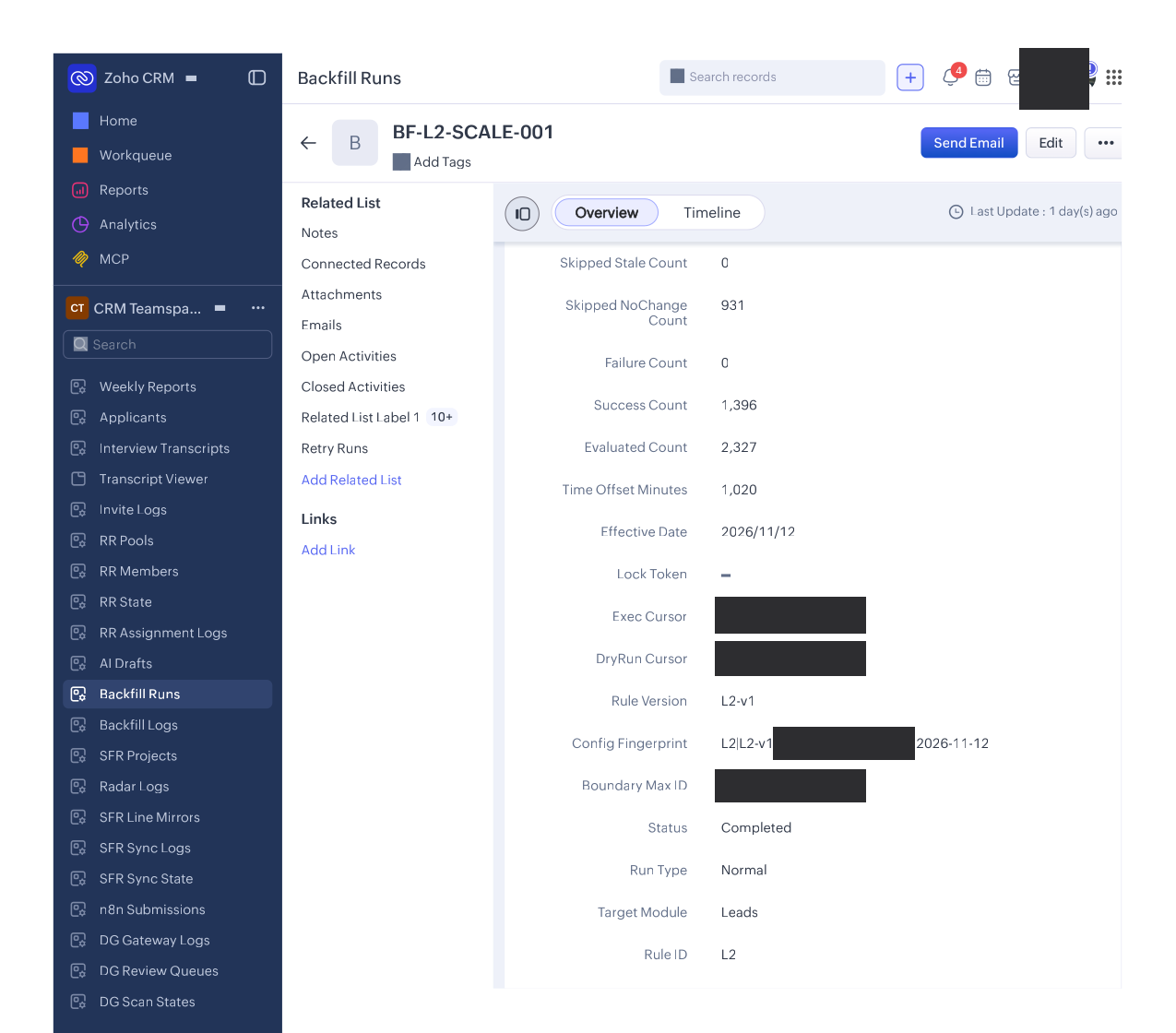
| Execution | 2,327 | 6 | 91.69 s in total (13.99 to 17.77 s each) | 1,396 written, 0 failed, 931 unchanged |
The extra record in the execution was a test lead created after the dry run whose id fell below the frozen boundary, so it was correctly part of the range. The times are the sum of the function run times. I started each invocation by hand, so elapsed time also depended on how quickly I started the next one.
Each invocation handled at most 400 records (2 pages of 200). Between invocations the job sat in Paused_Budget, and it passed through that status 5 times before completing.
Credits: the CRM API usage dashboard (trailing 24 hours at 12:14 JST on 2026-11-12) attributed 298 credits to the Runner function. That window covers the whole day's work on rules L2 and D1, including the 2,327-record execution, not the scale run alone. The org-wide total was 6,475 of a 56,000 limit, shared with other projects in the same trial org.
What can go wrong when you build a backfill in Deluge?
These came from measurement, not from documentation.
- Standalone functions can only return a string. Declaring a
Mapreturn type was refused on save withInvalid return Type Map. Category standalone returns string, andvoidwas refused the same way. The rule evaluators returnmap.toString(), and the Runner converts the text back withtoMap(). - Pipeline needs the
actual_value. Sending"Standard"as the Pipeline of a deal failed withMAPPING_MISMATCH. The value that works is"Standard (Standard)", which is also what COQL returns. zoho.crm.updateRecordcan drop a bundled update without an error. One call with 11 fields returned 202 and applied nothing. The same values sent in small groups all applied. Every important save in the engine is now split into small groups and read back.- Record ids are not assigned in time order. A record created after the dry run can have a smaller id than the boundary. That happened twice in testing. Describe the scope of a job as an id range, not as "records created before the dry run".
Last_Activity_Timemoves when you write. A write that touched only theBF_fields, with workflows suppressed, movedLast_Activity_Timeto the write time. A rule that readsLast_Activity_Timewould change its own result after the first write, so the stale rule uses a business date field instead.- A shorter field length is enforced without warning. I lowered a text field's maximum length from 255 to 20 to force a failure. Zoho gave no warning about longer existing values, and the update was rejected with HTTP 400, not truncated. The job ended
CompletedWithErrors, with a failure row and the lead unchanged.
What are the limits of this prototype?
- 400 records per invocation. I planned for 1,000 evaluations per invocation, but the 2-page cap binds first. On an hourly schedule, 2,300 records would take about 6 hours per phase. The scale test was driven by hand instead.
- Three fixed rules. L1, L2, and D1 only. There is no free-form condition, no formula input, and no action other than writing fields.
- A small race window (TOCTOU) remains. TOCTOU (time-of-check to time-of-use) is the gap between checking a record and writing it. Someone could edit the record between the stale check and the update, and the update does not use a conditional header. I accepted that because the engine writes only its own
BF_fields on synthetic data. A version that writes real business fields must close this gap. - Not reproduced: a crash in the middle of a write. The order "Intent row, update, Outcome row, cursor" was confirmed in every execution log, but I could not kill an invocation between the update and the Outcome row from the editor. A real Zoho "internal error" did end one dry run invocation. Nothing was saved, the cursor stayed at the previous checkpoint (800 evaluated), and the next invocation resumed and finished.
- Not verified: timed schedule firing. The Schedule function saved and can be selected on the Schedules screen. I did not create a schedule because the org is shared with other projects.
- Scale tested up to 2,327 records per job. Larger volumes were not tested.
Frequently asked questions about applying rules to existing Zoho CRM records
Do Zoho CRM workflow rules run on existing records?
Not if the rule is triggered by a record action such as create, edit, or delete: it evaluates only the record involved in that action, so a new rule does not change existing records that nobody touches. The built-in exception is a date-field trigger, which covers every record matching its criteria (in batches of up to 5,000 per 10 minutes, according to Zoho's English help), but it runs on the date and cannot evaluate a rule with a dry run, an approval step, or a calculation. To apply a new rule to old records on your own schedule, update those records yourself, either with a bulk update or with a backfill job that evaluates each record.
Can I use Mass Update to apply a workflow to existing records?
Partly. According to the Mass Update API documentation, the record-id type updates up to 500 records per call and does fire automation. The custom-view type handles up to 50,000 records but fires automation only when fewer than 1,000 records are updated. In both cases every record gets the same value, so per-record logic is not possible.
How do I update thousands of Zoho CRM records with Deluge without hitting the timeout?
Split the work into short invocations that each process a fixed number of records and save a cursor (the last processed id) before they end. Page with id > cursor instead of OFFSET, and resume from the cursor on the next invocation. In my test, 2,327 leads took 6 invocations of 400 records or fewer, each finishing in 13.99 to 17.77 seconds.
Does "trigger": [] stop workflows when you update Zoho CRM records from Deluge?
In my test, yes, for an update sent with invokeurl. I set up a temporary workflow that wrote a marker on edit. An update without trigger fired it, and the same kind of update with "trigger": [] wrote the values without firing it. I did not test other update paths in this prototype.
Will a backfill change Last_Activity_Time on Zoho CRM leads?
In my org, it did. A write that touched only new fields, with workflows suppressed, moved Last_Activity_Time to the time of the write. Do not use Last_Activity_Time or Modified_Time as input to a rule that writes to the same records.
Related builds on this blog:
- Human-approved AI drafts in Zoho CRM: the same "a person approves before anything is written" pattern, applied to AI output instead of a bulk job.
- Round-robin lead assignment in Zoho CRM with an assignment log: another build where a log explains why every record ended up where it did.
- Zoho Bookings and CRM check-in follow-up: where the 17-hour
zoho.currenttimeoffset that this engine corrects for was first measured.
The code, field definitions and setup notes are on GitHub: zoho-crm-backfill-engine-sample
About the author: I build Zoho CRM customizations and integrations, covering requirements, Deluge development, API work, and rollout support. This article describes a prototype in my own test organization, not a client project. If you need a rule applied to thousands of existing Zoho CRM records and want a dry run and an approval step before anything is written, you can reach me on LinkedIn or Upwork.