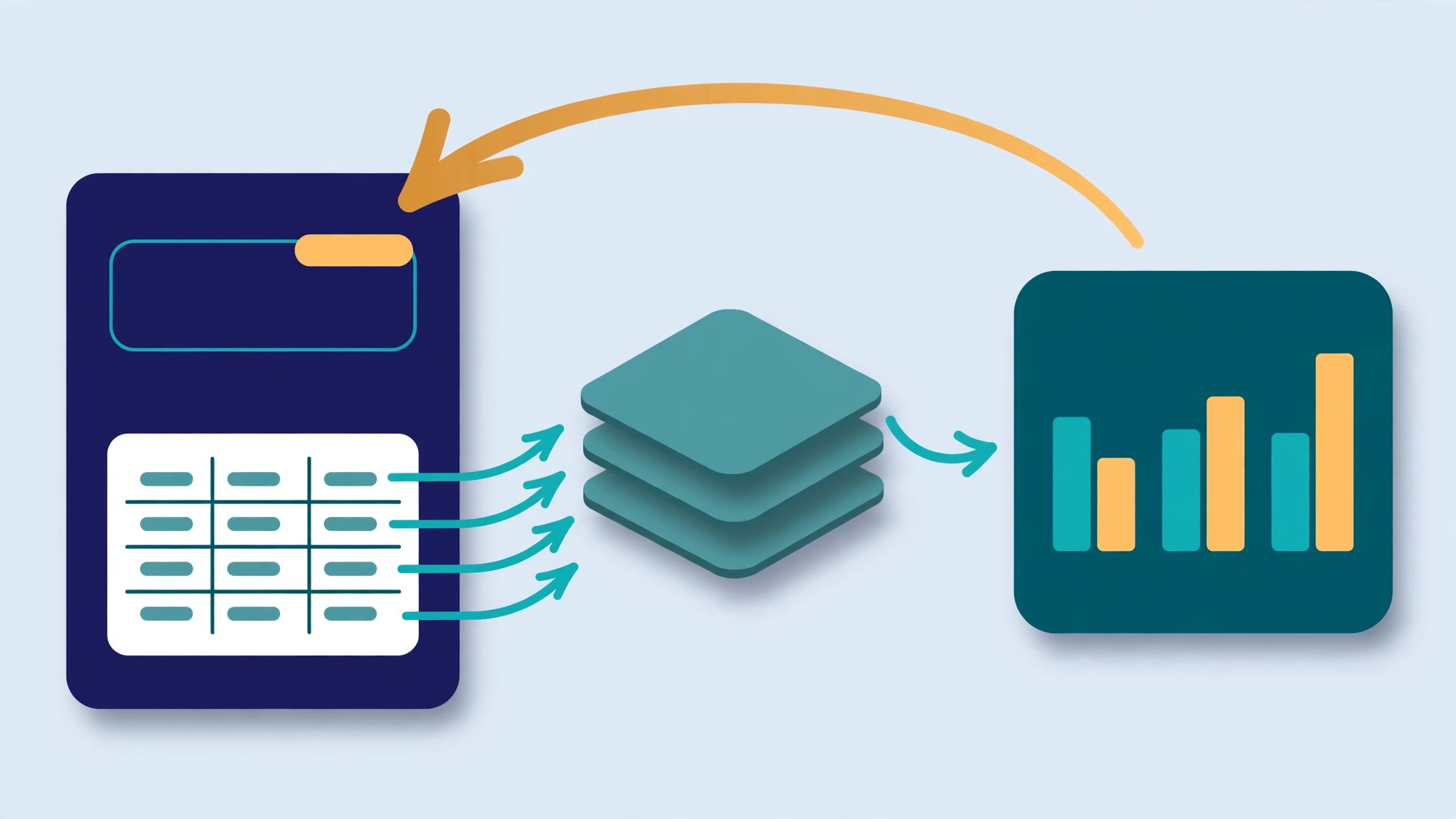
The short answer: if a subform-based report is not enough and you need each Zoho CRM subform row to stand on its own as a record, copy each row into a normal custom module and build the report on that module. In my test org, a Deluge function mirrors every subform row into its own record, keyed by the parent record ID plus the subform row ID. On every sync it also recalculates the parent's total, row count and latest date. These are the rollups: figures calculated from the subform rows and stored in ordinary fields on the parent. A report grouped on the mirror module matched the parent's rollup exactly (909.50 against 909.50), and all 28 test cases I ran passed.
Disclosure: I build Zoho systems for a living, so I have a commercial interest in this topic. Everything below was built and tested on 10–11 November 2026 in my own Zoho CRM organization (an Ultimate edition trial) with synthetic data. It is not client work, and every number comes from that test environment.
When is a native Zoho CRM subform report not enough?
A subform is a table inside a record: one parent holds many line items, such as work entries on a project. How to report on those rows (group, filter, export, total on the parent) has been a common question on Zoho's community forums for years.
Zoho CRM does have a native answer. The official help article Building a Subform describes subform-based reports: when you create a report on the parent module, the subform is listed under Related Modules, and selecting it lets you report on its fields, for example each product with the sum total of its sub-products. If that report gives you what you need, start there. Zoho's Subforms API documentation also says a subform can have up to five aggregate custom fields, and Zoho CRM documents rollup summary fields that aggregate values from a record's related lists. I did not test subform-based reports, aggregate fields or rollup summary fields in this build, so I will not claim where they fall short in your edition.
What this build needed was every row as an independent record. I wanted the row itself to be the subject of the report, not a list of rows attached to a parent, and I wanted the totals written back to ordinary fields on the parent so other screens could use them. That is a mirror module: a custom module holding one read-only copy of each subform row.
How does the subform mirror work?
The setup is one parent module (SFR_Projects) with one subform (Work_Lines), a mirror module (SFR_Line_Mirrors), a sync log and a reconcile-state module. The logic is Deluge, Zoho's scripting language for functions and automation.
One subform row, one mirror record
Each mirror stores the parent record ID, the subform row ID and a key made from both. Matching uses that key, never row position or content. Two rows with identical values still get two mirrors, and a reordered row keeps its mirror. The mirror also stores the row's position, so a report can show rows in screen order.
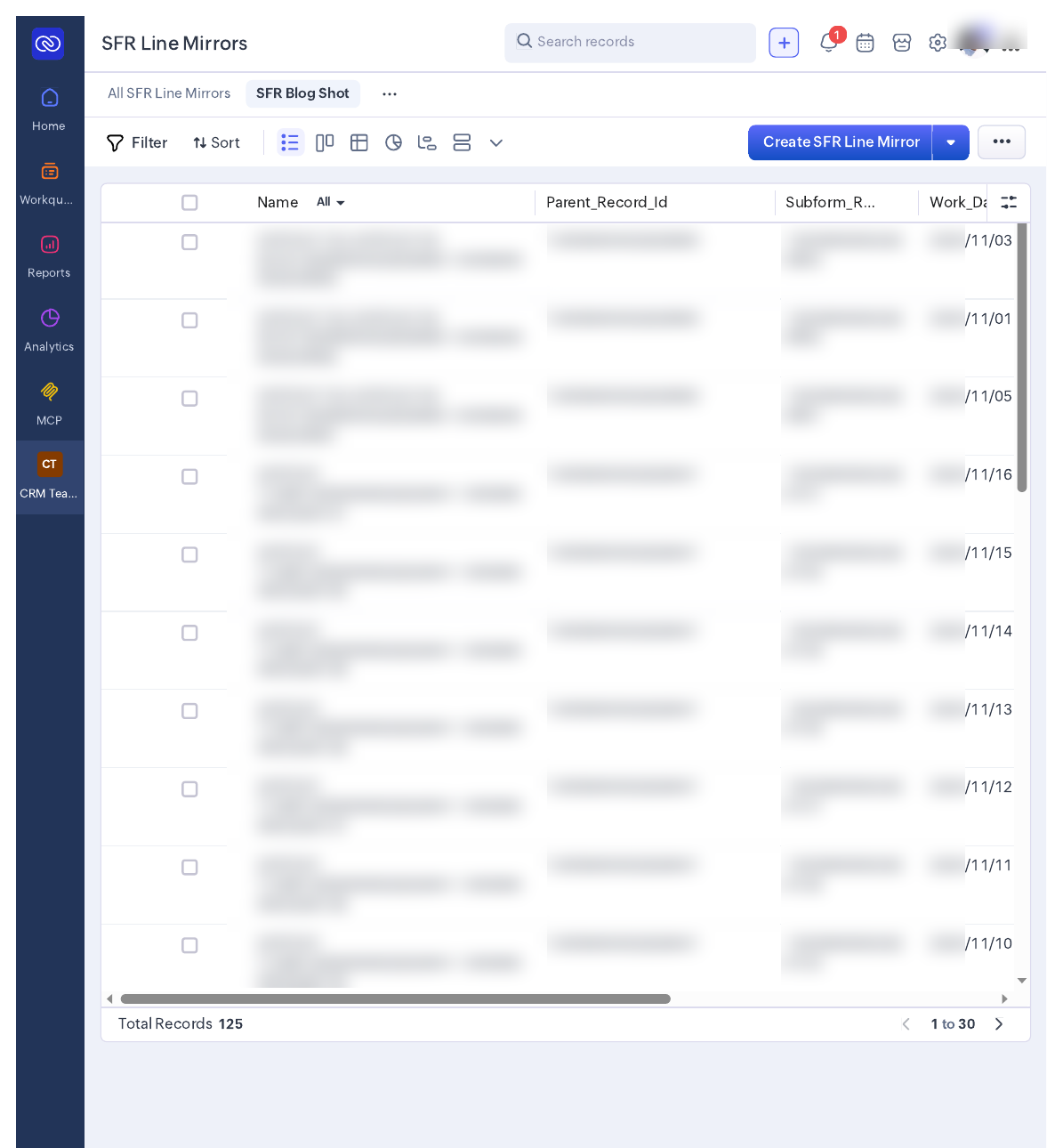 The mirror module: each subform row becomes an ordinary record, with the parent record ID and subform row ID that identify it.
Three ways a sync starts
- Workflow. A single "create or edit" rule on the parent calls the sync function. In my tests, edits that touched only the subform also fired this rule.
- Resync button. A button on the parent's detail page runs the same sync on demand.
- Hourly reconcile. A scheduled function walks every parent, re-syncs it, repairs drift and removes orphaned mirrors.
All three call one core function with the same guards. The sync is one-way: the subform is the source of truth, and a hand-edited mirror is overwritten at the next reconcile.
Rolling totals back to the parent
The function recalculates the rollups from all subform rows every time (SUM of Amount, COUNT of rows, MAX of Work_Date) rather than adjusting the previous figure. It writes to the parent only when one of five fields (the three rollups, sync status and last error) has changed. The write carries an If-Unmodified-Since header, the same protection I used in my duplicate lead gateway for Zoho CRM. If someone edited the parent in the meantime, Zoho answers 412 ALREADY_MODIFIED (Update Records), and the function re-reads the parent and tries once more.
The write-back never includes the subform field. From earlier projects, I know that sending an empty array for a subform deletes every row. I did not re-test that here; I simply never send the subform key. When I deleted all five rows of a test parent, the rollups dropped to zero and the subform stayed exactly as the user left it.
Guards against deleting the wrong thing
- Snapshot before delete. A mirror's key and values go to the sync log before it is deleted.
- Bulk-replace guard. If a single sync would delete more than half of a parent's existing mirrors and add new ones, it stops and deletes nothing, although it still refreshes the parent's rollups from the current subform. A broken response that changed every row ID would look exactly like that.
- Failure cap. After three failures in a row, the parent is marked
failedand the reconcile skips it until someone runs the button. Three is a provisional prototype setting, not a recommendation.
What did the tests measure?
I wrote 30 test cases (T01 to T31, with T21 dropped from this phase). I ran 28, and all 28 passed. Not all of them passed first time: the first batch (T01 to T03) failed until I fixed a list check, and T07 failed until I fixed the deleted-record check. Both fixes are described in the next section. Two were not run, with documented reasons: T06 needed the subform field deleted, which would have destroyed other test data, and T26 needed a 412 conflict I could not provoke.
| What I measured (10–11 Nov 2026) | Result |
|---|---|
| Report on the mirror module, one parent, grouped by line item | 6 groups totalling 909.50, equal to the parent's rollup (SUM 909.50, COUNT 6) |
| Subform at 100 rows, sync from the button | 100 mirrors added; SUM 5050.00, COUNT 100, MAX 2026-11-28 |
| One-row edit on the 100-row parent, via workflow | 1 mirror updated; SUM 5051.00 |
| Deleted mirror, mirror amount changed to 9999, fake mirror added | One reconcile repaired all three (added 1, updated 1, deleted 1) |
| Full on-demand reconcile | 11.84 seconds |
| Workflow re-firing caused by the function's own write-backs | None: the rule's function run count stayed at 19 |
| API credits in the 24-hour window covering the test run (2026-11-10 06:19 to 2026-11-11 06:19) | 177 for the four sync functions combined (69 + 42 + 33 + 33) |
Context: the sync log records times only to the minute, so for the 100-row sync I can only say it completed without a time-limit error. The org held 12 parents, 125 mirrors and 68 log entries at the end. Credits come from the API Credits Usage view in Zoho's Developer Hub; the whole org used 2,609 of 56,000 in that window, including other work. Amounts on screen are rounded: in this org, reports and currency fields display yen without the decimal part. The 909.50 is the total calculated from the record values, and it is the same amount the report screen shows as ¥910.
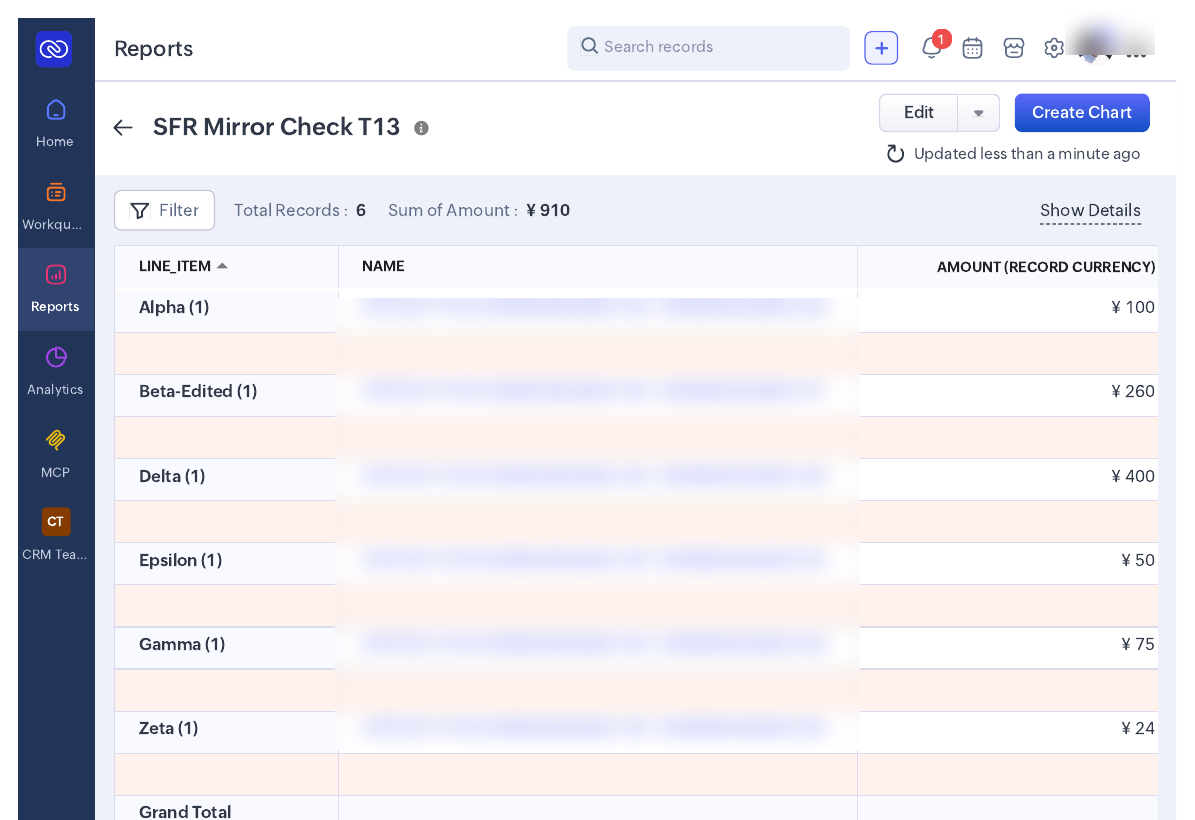 A standard report on the mirror module, grouped by line item. The 909.50 total matches the rollup written back to the parent record. The report shows it as ¥910 because this org displays yen without decimals; the source records still sum to 909.50, matching the parent's rollup.
What did I learn about subforms the hard way?
- A deleted record does not return an error code. A single GET on a deleted parent returned HTTP 204 with no body. My orphan check expected an error code, so T07 first failed. The decisive check is now a COQL
COUNT(id)that returns 0 in the response body. COQL is Zoho CRM's SQL-like query API, and it can query a subform as a module (COQL overview). A 204 alone never counts as proof. - An empty subform looks different depending on how you read it. Through a REST GET with
invokeurl, an empty subform came back asnull. Throughzoho.crm.getRecordById, it came back as an empty list. Zoho also returns subform values only when you fetch a single record (Get Records). The sync now reads the parent withgetRecordById. - Do not test for a list with
toString().startsWith("["). That check failed on real subform rows in my org, and it made every case in the first test batch fail. The guard is now a plain null check. - Subform row IDs are stable, with one exception. A row kept its ID through value edits, reordering, and a restore from the recycle bin. Only a row that was deleted and added again got a new ID, which the sync correctly treats as one delete and one add.
- Imports and restores do not fire the workflow. The import wizard's option to trigger automation is off by default; with it off, no sync ran (I did not test it on). Restoring from the recycle bin did not fire the rule either. The next reconcile picked both up.
zoho.currenttimeran on UTC-8 in this org, 17 hours behind Japan time. Read function-written times, including the log's, with that in mind.- Custom subforms start with a 25-row limit. I raised "Maximum row entries allowed" to 100 in the subform properties before the 100-row test.
What are the honest limitations?
- One parent module and one subform, set as constants at the top of the function. Not a general engine.
- The mirror is one-way and read-only. The Standard profile had no permission on the four new modules by default; grant View only if users need the reports.
- Imports and restores show up late, after the next reconcile.
- The hourly schedule missed twice. On 11 November the 00:30 and 02:30 (Japan time) runs left no trace; the cause is unknown. As a fallback, a standalone function runs the full reconcile on demand.
- 412 handling is code-reviewed, not field-tested. My two "simultaneous" saves ran 42 seconds apart.
- A failed write-back leaves no mark on the parent. The mirrors are correct, but the old rollup stays until the next reconcile rewrites it. Only the sync log shows the failure.
- The bulk-replace guard also blocks legitimate large rewrites. Those parents need a manual resync.
What would I do in a real deployment?
- Build it in a Sandbox first against a copy of your real subform, and check the row limit for your edition.
- Agree the reconcile interval and failure cap with whoever will own the log, and make someone responsible for reading it.
- Every write-back changes the parent's Modified Time, so check for automations that react to it.
- Then run one reconcile to backfill mirrors for existing records.
As with my round-robin lead assignment build for Zoho CRM: prove the logic in a test org with synthetic data, and write down what you could not prove.
The code, module/field definitions and full test log are on GitHub: zoho-crm-subform-rollup-sample
Frequently asked questions
Can you report on subform fields in Zoho CRM? Yes: Zoho CRM's official help describes subform-based reports, where you select the subform under Related Modules when you create a report on the parent module. If you need each row as an independent record instead, mirror the rows into a custom module and build the report on that module. In my test org, a report grouped by line item on the mirror module matched the parent's rollup exactly. I did not test the native subform-based report itself, so check what it gives you in your own org first.
What happens to copied Zoho CRM subform rows when the parent record is deleted? In the mirror build described here, the copies (mirror records) are not removed straight away, because the build uses no delete trigger. The next reconcile, the scheduled pass that compares every parent's subform with its mirror records, finds mirrors whose parent is gone, confirms the deletion with a COQL count of zero, logs a snapshot, and deletes them. Until then, those orphaned mirror records can still appear in reports.
How many Zoho CRM API credits does a subform sync use? In my test org, the four Deluge functions that sync subform rows into the mirror module used 177 API credits combined in the 24-hour window that covered my whole test run. That was a small org (12 test parents at the end) with many deliberate edits, deletes and repairs. The cost grows with the number of parent records and the reconcile frequency.
Does editing only the subform trigger a sync? In my tests, yes: subform-only edits fired the parent's "create or edit" workflow rule. Imports (automation option off) and recycle-bin restores did not; the reconcile caught those.
About the author: I build Zoho CRM customizations and integrations, covering requirements, Deluge development, API work and rollout support. This article describes a prototype in my own test organization, not a client project. If your team needs reports or totals from Zoho CRM subforms, you can reach me through the contact page, which links to LinkedIn and Upwork.