
Disclosure: I build this kind of system for a living, so I have a commercial interest in this topic. Where a simpler answer would serve you better, I say so.
The short answer: if routine office work is taking your best people away from growing the business, you can often move that work to AI without replacing your CRM. Keep your records where they are, let AI prepare the drafts, and have a person approve anything that reaches a customer.
What problem does this solve?
It solves a staffing problem more than a technology problem.
In many service businesses, the same people who know the customers also write the quotes, retype notes between systems, and chase missing details. None of it is hard, but all of it needs someone who understands the business. Those are usually the people you would rather have running a new service line, winning a larger account, or looking after the team.
To focus on something new, someone else has to take over the routine work. The usual answer is to hire. For the repetitive parts, a small piece of software can do the first draft instead, and your person checks it. In my view, that is what you are really buying: people back, not AI for its own sake.
This fits some companies better than others.
| This fits when... | Look elsewhere when... |
|---|---|
| You already have customer data in a CRM | Your customer records are scattered or missing |
| The same office task repeats every day | Every job is completely different |
| You have no technical team and do not want one | You already have developers with time to do this |
| A person can check the result in a minute or two | Nobody has time to check anything |
If the work barely repeats, or if a simple CRM setting would fix it, start there. You may not need AI at all.
What does the architecture look like?
It has five parts, and your CRM stays at the center.
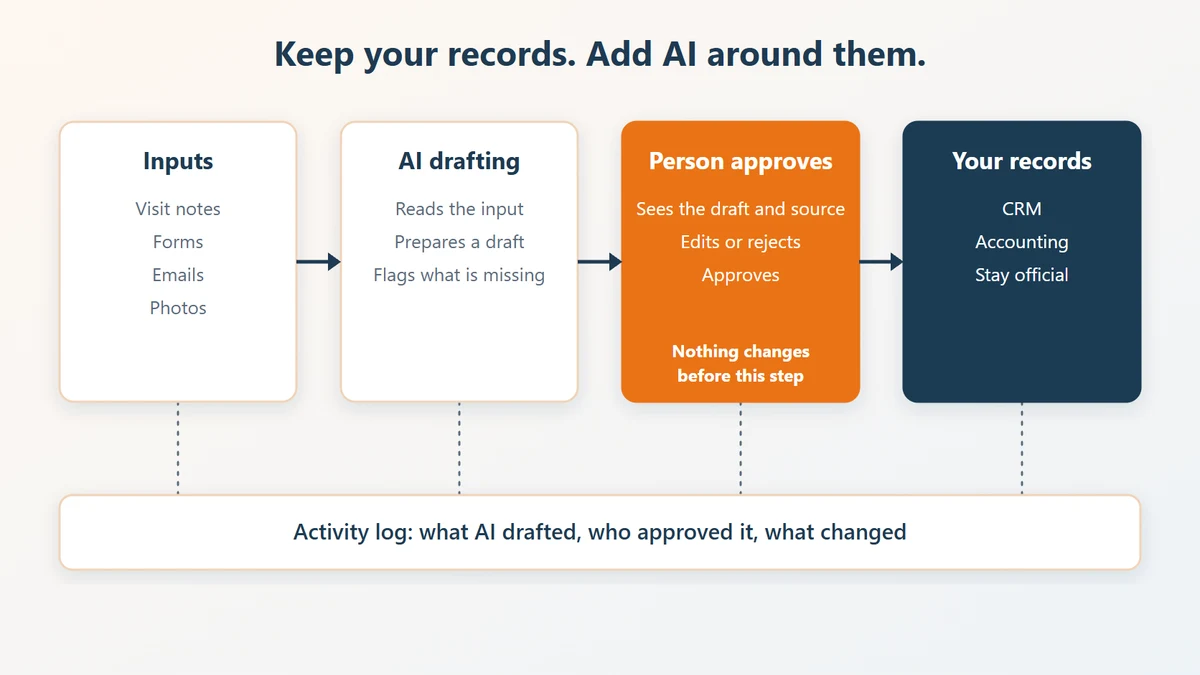
| Part | What it does | What it can be built with |
|---|---|---|
| Inputs | Collects visit notes, forms, emails, call transcripts, and photos | The tools your team already uses |
| AI drafting | Reads the input and your price list, then prepares a draft and lists what is missing | A model such as Claude, on your own cloud or the CRM vendor's platform |
| Review screen | Shows the draft and its sources so a person can edit, approve, or reject it | A Zoho CRM widget, an app on Zoho Catalyst, or your own Azure or AWS environment |
| Your records | Stay the official version of the customer, the deal, and the invoice | Your existing CRM and accounting system |
| Activity log | Records what AI drafted, who approved it, and what changed | A simple database table |
You do not have to replace anything to start. Zoho CRM, HubSpot, and Salesforce all publish documentation for connecting AI tools through the Model Context Protocol (MCP).
Three rules keep this safe:
- AI reads through limited tools. It gets access only to the records the task needs.
- Nothing changes until a person approves. The AI writes to the review screen, not to your CRM or your customer's inbox.
- Every step leaves a record. When something looks wrong, you can see where it came from.
If you are still deciding whether to replace your CRM, I wrote about that in Should You Replace Your CRM With AI?
What could this look like in practice?
The story below is fiction based on real projects. I changed the company, the industry, the tools, and the details so that no real company can be identified. Please read it as an illustration, not as evidence.
A home repair company has a coordinator who writes every quote. Each one means reading a technician's notes, checking the price list, and typing line items into the accounting system. The owner wants that coordinator to run a new maintenance program, but quotes fill the day.
Here is how the work changes:
- The technician records a short note and takes photos after the visit. They are saved to the customer's record.
- AI reads the note, the photos, and the price list, then writes a draft quote. It flags anything it could not find, such as a missing measurement.
- The coordinator opens the review screen, sees the draft next to the original note, and fixes what is wrong.
- After approval, the quote is created in the accounting system and linked to the deal in the CRM.
- The log records what the AI wrote and what the coordinator changed, so the team can see where drafts keep going wrong.

The coordinator still owns every quote. The job moves from typing to checking, and that is where the time for the maintenance program has to come from. How much time it frees depends on your work, so measure it instead of trusting anyone's estimate, including mine.
What should stay with people?
Keep these decisions with a named person, at least at first:
- anything sent to a customer
- prices outside your normal range, and any discount
- changes to many records at once
- payments and refunds
- who can see which customer's data
Widen what AI can do only after you have seen it work on real cases. Some tasks may never need to move.
What could go wrong?
- A wrong draft can look right. AI writes confident text even when it has misread the input. That is why the original note sits next to the draft.
- Approval can become a habit. If people click approve without reading, you have lost your safeguard. Check a sample of approved items each week.
- Missing data shows up fast. If your price list or customer records are incomplete, the drafts will be too. You may need to fix that first.
- Someone has to look after it. Tools and business rules change. Decide who owns the system before you start, and turn off access when people leave.
Where should you start?
Start with one task and a small test.
- Pick a task that repeats often, has past examples, and is easy for a person to check.
- Measure it for two weeks. How many times does it happen, and how long does each one take?
- Build only the draft and the review screen. Nothing goes out without approval.
- Run it for a month, then compare the time, the error rate, and what your team thinks.
- Keep it, change it, or stop. Move on to a second task only if the first one earned it.
Who is writing this?
I am Kotaro Izumida, an engineer based in Japan. I have worked on building and customizing Zoho for more than three years, and I also implement with AI.
The most important question is not which AI tool to use. It is which of your people you want back, and what you would have them do instead.
If you have a back-office task that is holding someone back, message me on LinkedIn or hire me on Upwork and tell me about it.